Documentation Index
Fetch the complete documentation index at: https://docs.trychannel3.com/llms.txt
Use this file to discover all available pages before exploring further.
Many products come in more than one configuration: a shirt in several colors and sizes, a shoe in multiple widths, a phone in different storage tiers. Channel3 models these as variants, and exposes them on the variants field of a Product.
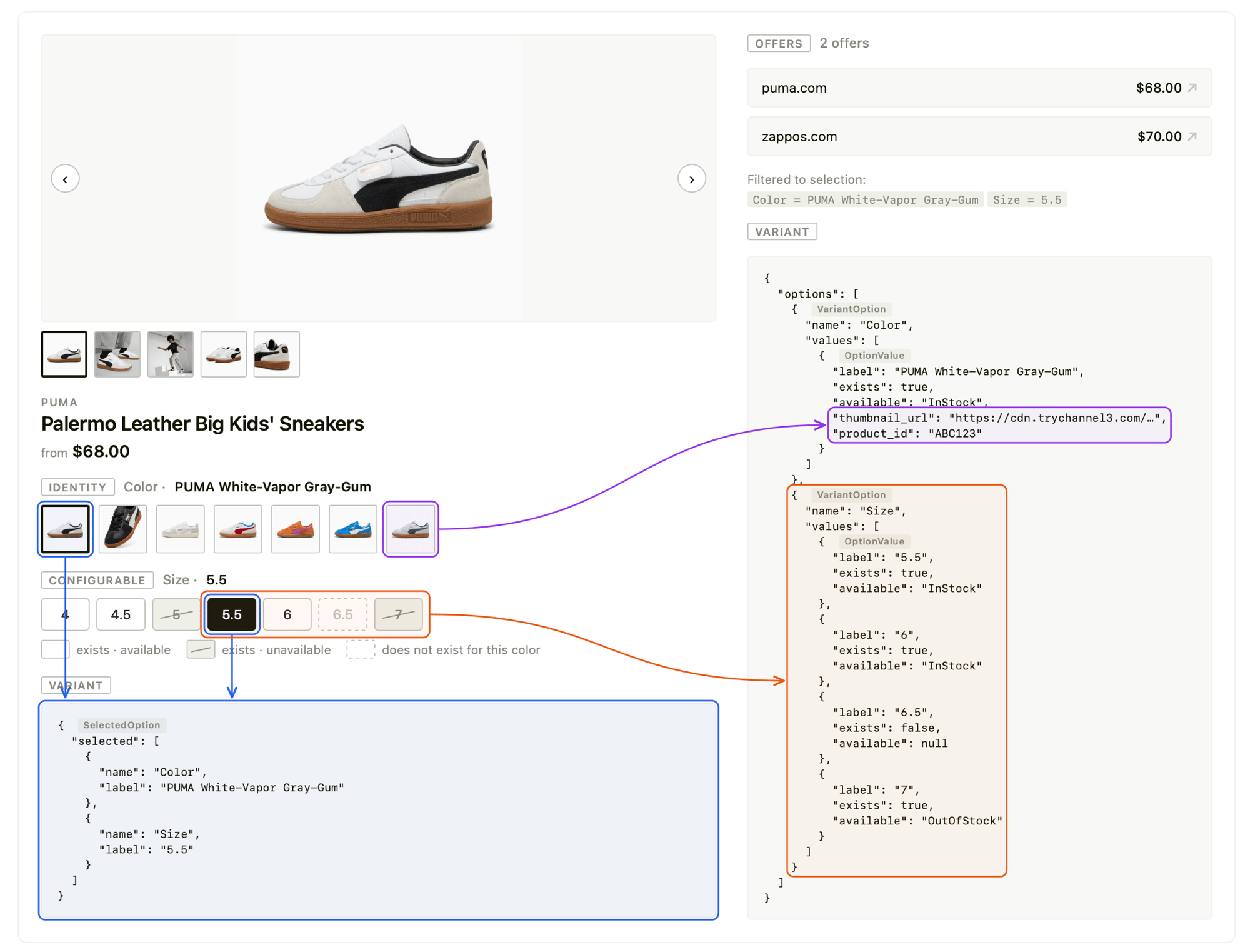
The variant model follows the UCP catalog lookup specification: a product carries a set of options (the dimensions a shopper can choose, like Color and Size), each option has a set of values (Blue, Red, XL), and every value carries the two availability signals UCP defines — exists and available. The selected array reflects the effective selection after the server resolves your request.
The variant data model
Product.variants is either null (the product has no variations) or a Variants object:
{
"variants": {
"options": [
{
"name": "Color",
"values": [
{
"label": "Midnight Blue",
"exists": true,
"available": "InStock",
"thumbnail_url": "https://cdn.trychannel3.com/asdf",
"product_id": "x8k2mq4"
},
{
"label": "Forest Green",
"exists": true,
"available": "OutOfStock",
"thumbnail_url": "https://cdn.trychannel3.com/abcd",
"product_id": "p3n7wz9"
}
]
},
{
"name": "Size",
"values": [
{ "label": "S", "exists": true, "available": "InStock" },
{ "label": "M", "exists": true, "available": "InStock" },
{ "label": "XL", "exists": false, "available": null }
]
}
],
"selected": [
{ "name": "Color", "label": "Midnight Blue" },
{ "name": "Size", "label": "M" }
]
}
}
Variants
| Field | Type | Relevance |
|---|
options | VariantOption[] | Every dimension the product can be configured along. Render one selector (row of swatches or pills) per option. |
selected | SelectedOption[] | The effective selection after the server resolves your request — the configuration the returned product currently represents. Use it to highlight the active value in each selector. |
VariantOption
| Field | Type | Relevance |
|---|
name | string | The dimension name ("Color", "Size"). Use as the selector’s label. |
values | OptionValue[] | Every possible value for this dimension across the whole product family — including values that don’t exist for the current selection (see exists). |
OptionValue
| Field | Type | Relevance |
|---|
label | string | The display value ("Blue", "XL"). This is also the value you send back when selecting (see Selecting a variant). |
exists | boolean | Whether this value forms a real variant given the other selected options. false means the combination isn’t offered (e.g. the shirt exists in XL, but not in this color + XL). Always present. See available vs exists. |
available | AvailabilityStatus | null | Stock status of this value. Not hydrated on /v1/search — it is always null on search results. |
thumbnail_url | string | null | A swatch image for this value (e.g. a color chip). When set, render the value as an image swatch rather than a text pill. |
product_id | string | null | When set, this value resolves to a different product. Selecting it should navigate to that product ID rather than re-fetching the current one. Pairs with thumbnail_url for swatch-style selectors. |
SelectedOption
| Field | Type | Relevance |
|---|
name | string | The option this selection applies to. Matches a VariantOption.name. |
label | string | The currently selected value for that option. Matches an OptionValue.label. |
AvailabilityStatus
available is one of the following stock statuses:
| Value | Meaning |
|---|
InStock | Purchasable now. |
LimitedAvailability | Purchasable, low stock. |
PreOrder | Orderable ahead of release. |
BackOrder | Orderable, ships when restocked. |
SoldOut | Temporarily unpurchasable. |
OutOfStock | Not currently purchasable. |
Discontinued | No longer offered. |
Unknown | Stock state could not be determined. |
Search vs. product detail
The same variants shape is returned by both endpoints, but available is only populated on product detail. This is the single most important difference to design around.
| POST /v1/search | GET /v1/products/{id} |
|---|
options, values, labels | ✅ Full set | ✅ Full set |
exists | ✅ Populated | ✅ Populated |
thumbnail_url, product_id | ✅ Populated | ✅ Populated |
available | ❌ Always null | ✅ Hydrated per value |
Honors option_* selection params | ❌ | ✅ |
Search is optimized for breadth — it returns the full option matrix so you can render selectors immediately, but it does not compute per-value stock. When you display a product for purchase, refetch it with GET /v1/products/{id} to get live available values (this call is free).
from channel3 import Channel3
client = Channel3(api_key="YOUR_API_KEY")
# 1. Discover — variants present, but `available` is null on every value
results = client.products.search(query="merino wool sweater")
product = results.products[0]
for option in product.variants.options:
print(option.name, [v.label for v in option.values])
# Color ['Midnight Blue', 'Forest Green']
# Size ['S', 'M', 'XL']
# 2. Display — refetch to hydrate `available`
detail = client.products.retrieve(product.id)
for option in detail.variants.options:
for value in option.values:
print(option.name, value.label, value.exists, value.available)
# Color Midnight Blue True InStock
# Size XL False None
Selecting a variant
To resolve a specific configuration, pass each chosen value to GET /v1/products/{id} as an option_<OptionName>=<Label> query parameter. The option name and label are taken verbatim from VariantOption.name and OptionValue.label.
curl "https://api.trychannel3.com/v1/products/x8k2mq4?option_Color=Forest%20Green&option_Size=M" \
-H "x-api-key: $CHANNEL3_API_KEY"
The response reflects your selection in two places:
product fields (title, price, image, offers) update to the matching variant.
variants.selected echoes the effective selection.
Always read selected after relaxation
If the exact combination you requested doesn’t exist, the server relaxes your selection to the closest valid variant instead of returning nothing. Relaxation tries to satisfy the values you sent, but there is no guarantee every selection is honored — when a combination can’t be satisfied, some of your selections may be dropped to land on a real variant. Because the outcome isn’t guaranteed to match what you sent, detect what actually happened by diffing your request against variants.selected:
requested = {"Color": "Forest Green", "Size": "XL"}
detail = client.products.retrieve(
"x8k2mq4",
# option params are passed as query parameters; see cURL example above
)
effective = {s.name: s.label for s in detail.variants.selected}
for name, label in requested.items():
if effective.get(name) != label:
print(f"{name}: requested {label!r}, resolved to {effective[name]!r}")
# Size: requested 'XL', resolved to 'M'
Always render selectors from variants.selected, not from the values you sent — it’s the source of truth for what’s actually on screen.
Navigating across products
Some option values point at a separate product rather than reconfiguring the current one. These values have a non-null product_id (and usually a thumbnail_url). When a shopper picks one, navigate to that product ID instead of appending an option_* param:
function handleSelect(option: VariantOption, value: OptionValue) {
if (value.product_id && value.product_id !== currentProductId) {
// This value is a different product — navigate to it
navigate(`/products/${value.product_id}`);
} else {
// Same product, different configuration — re-resolve with option params
setSelection({ ...selection, [option.name]: value.label });
}
}
available vs. exists
exists and available describe two different kinds of “not quite,” and they should look different in the UI. Conflating them misleads shoppers — one means “you can’t buy this,” the other means “I’ll adjust your other choices to make this work.” Render values in three emphasis tiers, from full strength to faintest:
- Purchasable (
exists: true, in stock) — full emphasis. Solid border; the selected value gets a colored border and tint.
- Out of stock (
exists: true, available is SoldOut / OutOfStock / Discontinued) — dimmed. It’s a real, offered variant you simply can’t buy right now, so a muted/strike-through treatment is the right signal. (available is only meaningful on product detail; it’s null from search.)
- Not offered with current selection (
exists: false) — faintest of all. This does not mean the value is unavailable; it means this exact combination isn’t offered (e.g. you’ve selected Color: Forest Green and the green shirt was never made in XL). Make it the lightest element on screen — greyed text, muted fill, dashed border — so it clearly reads as “not a real option for what you’ve picked.” Crucially, keep it selectable: clicking it relaxes your other selections to land on a real variant.
The hierarchy matters: a non-existent value should look even lighter than an out-of-stock one, because it’s the weakest signal of the three — not “you can’t have this,” just “picking this will rearrange your other choices.” This mirrors hardware configurators like Apple’s, where incompatible options are greyed out with a — placeholder yet remain clickable.
| State | exists | available | Recommended styling |
|---|
| Purchasable | true | InStock / LimitedAvailability / PreOrder / BackOrder | Full emphasis. Selected → colored border + light tint. |
| Out of stock | true | SoldOut / OutOfStock / Discontinued | Dimmed (opacity-60 line-through). Keep it clickable to view; optionally add a “Sold out” tag. |
| Not offered with current selection | false | (null) | Lightest of all — border-dashed, muted fill (bg-muted/30), faded text (text-muted-foreground/40), with a — in place of any detail. Still fully clickable. |
| Stock unknown | true | null (search results) | Full emphasis; fetch product detail for live stock before checkout. |
Map each value to one of the tiers, then style from a lookup — no value is ever disabled:
const OUT_OF_STOCK = new Set(["SoldOut", "OutOfStock", "Discontinued"]);
// Emphasis tiers, strongest → faintest:
// selected → the active value
// available → purchasable, full strength
// outOfStock → a real variant you just can't buy right now (dimmed)
// notOffered → not a real option for the current selection (faintest).
// Still clickable: picking it relaxes your *other* choices.
function valueState(value: OptionValue, isSelected: boolean) {
if (isSelected) return "selected";
if (!value.exists) return "notOffered";
if (value.available != null && OUT_OF_STOCK.has(value.available)) return "outOfStock";
return "available";
}
const PILL: Record<string, string> = {
selected: "border-2 border-green-600 bg-green-50 text-foreground",
available: "border border-border bg-background text-foreground hover:border-foreground/40",
outOfStock: "border border-border bg-background text-muted-foreground opacity-60 line-through",
notOffered: "border border-dashed border-border/50 bg-muted/30 text-muted-foreground/40",
};
const SWATCH: Record<string, string> = {
selected: "border-2 border-green-600 ring-2 ring-green-600/20",
available: "border border-border hover:border-foreground/40",
outOfStock: "border border-border opacity-60 grayscale",
notOffered: "border border-dashed border-border/50 opacity-30",
};
function VariantSelector({ variants, selected, onSelect }: {
variants: Variants;
selected: Record<string, string>;
onSelect: (option: VariantOption, value: OptionValue) => void;
}) {
return (
<div className="flex flex-col gap-4">
{variants.options.map((option) => (
<div key={option.name} className="flex flex-col gap-2">
<label className="text-sm font-medium">{option.name}</label>
<div className="flex flex-wrap gap-2">
{option.values.map((value) => {
const isSelected = selected[option.name] === value.label;
const state = valueState(value, isSelected);
// A swatch when the value has its own image, otherwise a pill.
// Either way: always clickable, never `disabled`.
if (value.thumbnail_url) {
return (
<button
key={value.label}
onClick={() => onSelect(option, value)}
title={value.label}
className={cn(
"h-14 w-14 overflow-hidden rounded-lg transition-all",
SWATCH[state],
)}
>
<img
src={value.thumbnail_url}
alt={value.label}
className="h-full w-full object-cover"
/>
</button>
);
}
return (
<button
key={value.label}
onClick={() => onSelect(option, value)}
className={cn(
"flex flex-col items-start rounded-lg px-3 py-2 text-left text-sm transition-all",
PILL[state],
)}
>
<span>{value.label}</span>
{/* A non-existent value shows a placeholder instead of a price/detail. */}
{state === "notOffered" && <span className="text-xs">—</span>}
</button>
);
})}
</div>
</div>
))}
</div>
);
}
Key conventions in this example:
- Three tiers, never disabled —
valueState collapses exists + available into one of four labels, and the PILL / SWATCH lookups give each tier its own weight. Every value stays clickable so server-side relaxation can do its job.
- Faintest = not offered —
border-dashed + bg-muted/30 + text-muted-foreground/40 (and a — placeholder) make non-existent values the lightest thing on screen, clearly weaker than the dimmed out-of-stock tier.
- Swatches vs. pills — values with a
thumbnail_url render as image swatches; everything else is a text pill. Driven entirely by thumbnail_url, so you never need to know the underlying option type.
Summary
Product.variants carries options (dimensions → values) and selected (the effective configuration).
- Each
OptionValue exposes exists (is this combination offered?) and available (is it in stock?) — design your UI around both.
available is only hydrated on GET /v1/products/{id}; it’s null on POST /v1/search.
- Select a configuration with
option_<Name>=<Label> query params on product detail; the server relaxes invalid combinations, so always trust variants.selected.
- A value with
product_id set points to a different product — navigate to it instead of re-resolving in place.
- Render
thumbnail_url values as swatches, others as pills; dim non-existent (exists: false) and out-of-stock values while keeping them clickable.