> ## Documentation Index
> Fetch the complete documentation index at: https://docs.trychannel3.com/llms.txt
> Use this file to discover all available pages before exploring further.

# Variants

> Render and interact with product variant selectors — sizes, colors, and other options — using the Channel3 API.

Many products come in more than one configuration: a shirt in several colors and sizes, a shoe in multiple widths, a phone in different storage tiers. Channel3 models these as **variants**, and exposes them on the [`variants` field of a Product](/product-model#schema-variants).

The variant model follows the [UCP catalog lookup specification](https://ucp.dev/latest/specification/catalog/lookup/): a product carries a set of **options** (the dimensions a shopper can choose, like `Color` and `Size`), each option has a set of **values** (`Blue`, `Red`, `XL`), and every value carries the two availability signals UCP defines — `exists` and `available`. The `selected` array reflects the effective selection after the server resolves your request.

## The variant data model

`Product.variants` is either `null` (the product has no variations) or a `Variants` object:

```json theme={null}
{
  "variants": {
    "options": [
      {
        "name": "Color",
        "values": [
          {
            "label": "Midnight Blue",
            "exists": true,
            "available": "InStock",
            "thumbnail_url": "https://cdn.trychannel3.com/asdf",
            "product_id": "x8k2mq4"
          },
          {
            "label": "Forest Green",
            "exists": true,
            "available": "OutOfStock",
            "thumbnail_url": "https://cdn.trychannel3.com/abcd",
            "product_id": "p3n7wz9"
          }
        ]
      },
      {
        "name": "Size",
        "values": [
          { "label": "S",  "exists": true,  "available": "InStock" },
          { "label": "M",  "exists": true,  "available": "InStock" },
          { "label": "XL", "exists": false, "available": null }
        ]
      }
    ],
    "selected": [
      { "name": "Color", "label": "Midnight Blue" },
      { "name": "Size",  "label": "M" }
    ]
  }
}
```

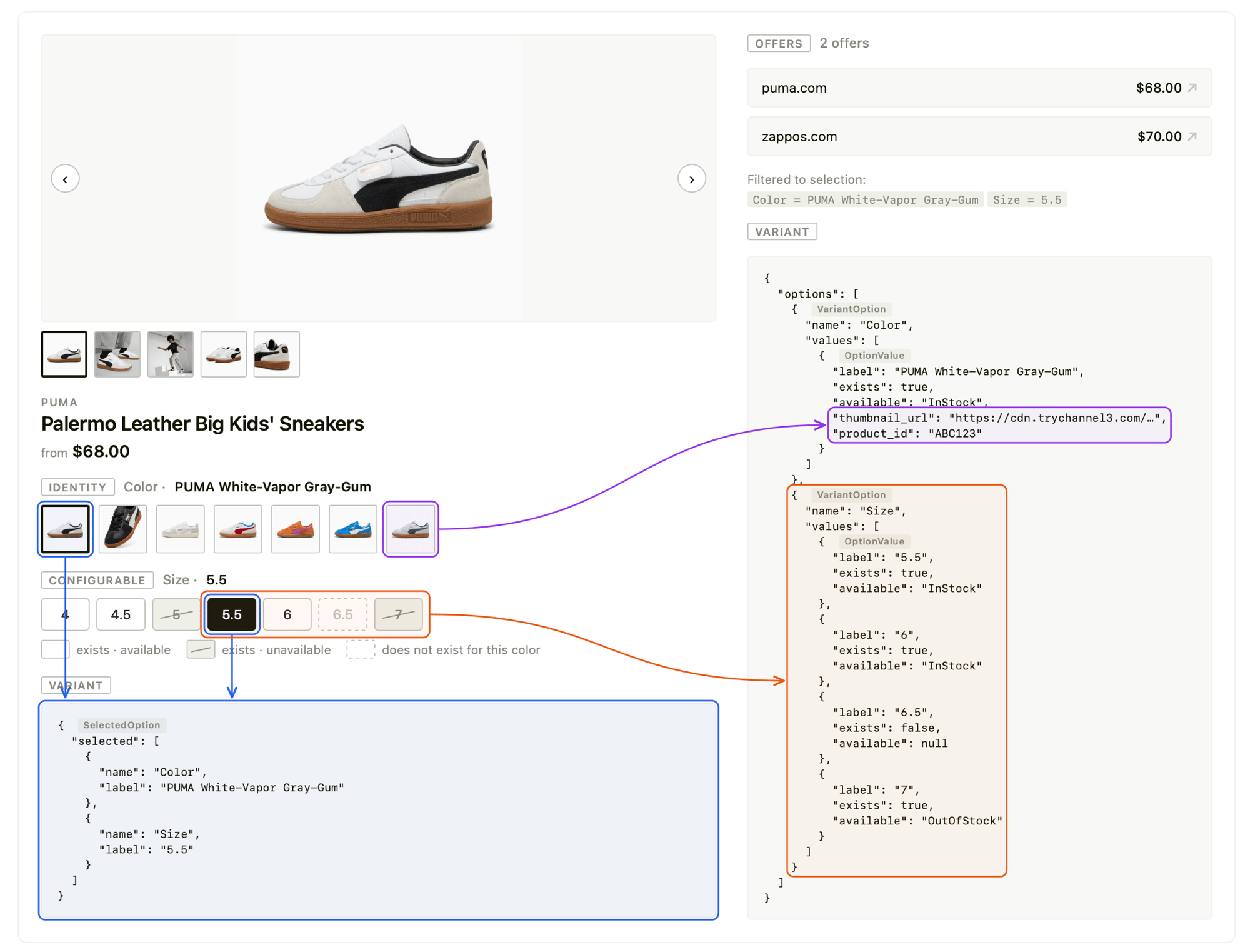
These fields map directly onto a product page — each `VariantOption` renders as a selector row, `selected` marks the active configuration, and every value's `exists`/`available` state styles its swatch or pill:

<img src="https://mintcdn.com/channel3/cHKfn8W5kppH_2NQ/public/variants-annotated.png?fit=max&auto=format&n=cHKfn8W5kppH_2NQ&q=85&s=b56a696a64030ee88e714876237bd7cf" alt="How the variant fields map to a product page: each VariantOption renders as a selector row, SelectedOption reflects the active Color and Size, and each OptionValue's exists/available state styles its swatch or pill" width="2000" height="1523" data-path="public/variants-annotated.png" />

### `Variants`

| Field      | Type               | Relevance                                                                                                                                                                                |
| ---------- | ------------------ | ---------------------------------------------------------------------------------------------------------------------------------------------------------------------------------------- |
| `options`  | `VariantOption[]`  | Every dimension the product can be configured along. Render one selector (row of swatches or pills) per option.                                                                          |
| `selected` | `SelectedOption[]` | The effective selection **after** the server resolves your request — the configuration the returned product currently represents. Use it to highlight the active value in each selector. |

### `VariantOption`

| Field    | Type            | Relevance                                                                                                                                                                     |
| -------- | --------------- | ----------------------------------------------------------------------------------------------------------------------------------------------------------------------------- |
| `name`   | `string`        | The dimension name (`"Color"`, `"Size"`). Use as the selector's label.                                                                                                        |
| `values` | `OptionValue[]` | Every possible value for this dimension across the whole product family — including values that don't exist for the current selection (see [`exists`](#available-vs-exists)). |

### `OptionValue`

| Field           | Type                                                  | Relevance                                                                                                                                                                                                                                               |
| --------------- | ----------------------------------------------------- | ------------------------------------------------------------------------------------------------------------------------------------------------------------------------------------------------------------------------------------------------------- |
| `label`         | `string`                                              | The display value (`"Blue"`, `"XL"`). This is also the value you send back when selecting (see [Selecting a variant](#selecting-a-variant)).                                                                                                            |
| `exists`        | `boolean`                                             | Whether this value forms a real variant **given the other selected options**. `false` means the combination isn't offered (e.g. the shirt exists in XL, but not in *this color* + XL). Always present. See [available vs exists](#available-vs-exists). |
| `available`     | [`AvailabilityStatus`](#availabilitystatus) \| `null` | Stock status of this value. **Not hydrated on [`/v1/search`](#search-vs-product-detail)** — it is always `null` on search results.                                                                                                                      |
| `thumbnail_url` | `string \| null`                                      | A swatch image for this value (e.g. a color chip). When set, render the value as an image swatch rather than a text pill.                                                                                                                               |
| `product_id`    | `string \| null`                                      | When set, this value resolves to a **different product**. Selecting it should navigate to that product ID rather than re-fetching the current one. Pairs with `thumbnail_url` for swatch-style selectors.                                               |

### `SelectedOption`

| Field   | Type     | Relevance                                                                     |
| ------- | -------- | ----------------------------------------------------------------------------- |
| `name`  | `string` | The option this selection applies to. Matches a `VariantOption.name`.         |
| `label` | `string` | The currently selected value for that option. Matches an `OptionValue.label`. |

### AvailabilityStatus

`available` is one of the following stock statuses:

| Value                 | Meaning                              |
| --------------------- | ------------------------------------ |
| `InStock`             | Purchasable now.                     |
| `LimitedAvailability` | Purchasable, low stock.              |
| `PreOrder`            | Orderable ahead of release.          |
| `BackOrder`           | Orderable, ships when restocked.     |
| `SoldOut`             | Temporarily unpurchasable.           |
| `OutOfStock`          | Not currently purchasable.           |
| `Discontinued`        | No longer offered.                   |
| `Unknown`             | Stock state could not be determined. |

## Search vs. product detail

The same `variants` shape is returned by both endpoints, but **`available` is only populated on product detail**. This is the single most important difference to design around.

|                                    | [`POST /v1/search`](/v1/search) | [`GET /v1/products/{id}`](/v1/products/\{product_id}) |
| ---------------------------------- | ------------------------------- | ----------------------------------------------------- |
| `options`, `values`, `labels`      | ✅ Full set                      | ✅ Full set                                            |
| `exists`                           | ✅ Populated                     | ✅ Populated                                           |
| `thumbnail_url`, `product_id`      | ✅ Populated                     | ✅ Populated                                           |
| `available`                        | ❌ Always `null`                 | ✅ Hydrated per value                                  |
| Honors `option_*` selection params | ❌                               | ✅                                                     |

Search is optimized for breadth — it returns the full option matrix so you can render selectors immediately, but it does **not** compute per-value stock. When you display a product for purchase, refetch it with `GET /v1/products/{id}` to get live `available` values (this call is **free**).

```python Python theme={null}
from channel3 import Channel3

client = Channel3(api_key="YOUR_API_KEY")

# 1. Discover — variants present, but `available` is null on every value
results = client.products.search(query="merino wool sweater")
product = results.products[0]

for option in product.variants.options:
    print(option.name, [v.label for v in option.values])
    # Color ['Midnight Blue', 'Forest Green']
    # Size  ['S', 'M', 'XL']

# 2. Display — refetch to hydrate `available`
detail = client.products.retrieve(product.id)
for option in detail.variants.options:
    for value in option.values:
        print(option.name, value.label, value.exists, value.available)
        # Color  Midnight Blue  True  InStock
        # Size   XL             False None
```

## Selecting a variant

To resolve a specific configuration, pass each chosen value to `GET /v1/products/{id}` as an `option_<OptionName>=<Label>` query parameter. The option name and label are taken verbatim from `VariantOption.name` and `OptionValue.label`.

```bash cURL theme={null}
curl "https://api.trychannel3.com/v1/products/x8k2mq4?option_Color=Forest%20Green&option_Size=M" \
  -H "x-api-key: $CHANNEL3_API_KEY"
```

The response reflects your selection in two places:

* **`product` fields** (title, price, image, offers) update to the matching variant.
* **`variants.selected`** echoes the **effective** selection.

### Always read `selected` after relaxation

If the exact combination you requested doesn't exist, the server **relaxes** your selection to the closest valid variant instead of returning nothing. Relaxation tries to satisfy the values you sent, but **there is no guarantee every selection is honored** — when a combination can't be satisfied, some of your selections may be dropped to land on a real variant. Because the outcome isn't guaranteed to match what you sent, detect what actually happened by diffing your request against `variants.selected`:

```python Python theme={null}
requested = {"Color": "Forest Green", "Size": "XL"}

detail = client.products.retrieve(
    "x8k2mq4",
    # option params are passed as query parameters; see cURL example above
)

effective = {s.name: s.label for s in detail.variants.selected}

for name, label in requested.items():
    if effective.get(name) != label:
        print(f"{name}: requested {label!r}, resolved to {effective[name]!r}")
        # Size: requested 'XL', resolved to 'M'
```

Always render selectors from `variants.selected`, not from the values you sent — it's the source of truth for what's actually on screen.

### Navigating across products

Some option values point at a **separate product** rather than reconfiguring the current one. These values have a non-null `product_id` (and usually a `thumbnail_url`). When a shopper picks one, navigate to that product ID instead of appending an `option_*` param:

```ts theme={null}
function handleSelect(option: VariantOption, value: OptionValue) {
  if (value.product_id && value.product_id !== currentProductId) {
    // This value is a different product — navigate to it
    navigate(`/products/${value.product_id}`);
  } else {
    // Same product, different configuration — re-resolve with option params
    setSelection({ ...selection, [option.name]: value.label });
  }
}
```

## `available` vs. `exists`

`exists` and `available` describe **two different kinds of "not quite,"** and they should look different in the UI. Conflating them misleads shoppers — one means "you can't buy this," the other means "I'll adjust your other choices to make this work." Render values in three emphasis tiers, from full strength to faintest:

1. **Purchasable** (`exists: true`, in stock) — full emphasis. Solid border; the selected value gets a colored border and tint.
2. **Out of stock** (`exists: true`, `available` is `SoldOut` / `OutOfStock` / `Discontinued`) — **dimmed**. It's a real, offered variant you simply can't buy right now, so a muted/strike-through treatment is the right signal. (`available` is only meaningful on product detail; it's `null` from search.)
3. **Not offered with current selection** (`exists: false`) — **faintest of all**. This does *not* mean the value is unavailable; it means this exact *combination* isn't offered (e.g. you've selected `Color: Forest Green` and the green shirt was never made in `XL`). Make it the lightest element on screen — greyed text, muted fill, dashed border — so it clearly reads as "not a real option for what you've picked." Crucially, **keep it selectable**: clicking it [relaxes](#always-read-selected-after-relaxation) your *other* selections to land on a real variant.

The hierarchy matters: a non-existent value should look **even lighter than an out-of-stock one**, because it's the weakest signal of the three — not "you can't have this," just "picking this will rearrange your other choices." This mirrors hardware configurators like Apple's, where incompatible options are greyed out with a `—` placeholder yet remain clickable.

| State                              | `exists` | `available`                                                  | Recommended styling                                                                                                                                                   |
| ---------------------------------- | -------- | ------------------------------------------------------------ | --------------------------------------------------------------------------------------------------------------------------------------------------------------------- |
| Purchasable                        | `true`   | `InStock` / `LimitedAvailability` / `PreOrder` / `BackOrder` | Full emphasis. Selected → colored border + light tint.                                                                                                                |
| Out of stock                       | `true`   | `SoldOut` / `OutOfStock` / `Discontinued`                    | Dimmed (`opacity-60 line-through`). Keep it clickable to view; optionally add a "Sold out" tag.                                                                       |
| Not offered with current selection | `false`  | (`null`)                                                     | **Lightest of all** — `border-dashed`, muted fill (`bg-muted/30`), faded text (`text-muted-foreground/40`), with a `—` in place of any detail. Still fully clickable. |
| Stock unknown                      | `true`   | `null` (search results)                                      | Full emphasis; fetch product detail for live stock before checkout.                                                                                                   |

Map each value to one of the tiers, then style from a lookup — no value is ever `disabled`:

```tsx theme={null}
const OUT_OF_STOCK = new Set(["SoldOut", "OutOfStock", "Discontinued"]);

// Emphasis tiers, strongest → faintest:
//   selected   → the active value
//   available  → purchasable, full strength
//   outOfStock → a real variant you just can't buy right now (dimmed)
//   notOffered → not a real option for the current selection (faintest).
//                Still clickable: picking it relaxes your *other* choices.
function valueState(value: OptionValue, isSelected: boolean) {
  if (isSelected) return "selected";
  if (!value.exists) return "notOffered";
  if (value.available != null && OUT_OF_STOCK.has(value.available)) return "outOfStock";
  return "available";
}

const PILL: Record<string, string> = {
  selected:   "border-2 border-green-600 bg-green-50 text-foreground",
  available:  "border border-border bg-background text-foreground hover:border-foreground/40",
  outOfStock: "border border-border bg-background text-muted-foreground opacity-60 line-through",
  notOffered: "border border-dashed border-border/50 bg-muted/30 text-muted-foreground/40",
};

const SWATCH: Record<string, string> = {
  selected:   "border-2 border-green-600 ring-2 ring-green-600/20",
  available:  "border border-border hover:border-foreground/40",
  outOfStock: "border border-border opacity-60 grayscale",
  notOffered: "border border-dashed border-border/50 opacity-30",
};

function VariantSelector({ variants, selected, onSelect }: {
  variants: Variants;
  selected: Record<string, string>;
  onSelect: (option: VariantOption, value: OptionValue) => void;
}) {
  return (
    <div className="flex flex-col gap-4">
      {variants.options.map((option) => (
        <div key={option.name} className="flex flex-col gap-2">
          <label className="text-sm font-medium">{option.name}</label>
          <div className="flex flex-wrap gap-2">
            {option.values.map((value) => {
              const isSelected = selected[option.name] === value.label;
              const state = valueState(value, isSelected);

              // A swatch when the value has its own image, otherwise a pill.
              // Either way: always clickable, never `disabled`.
              if (value.thumbnail_url) {
                return (
                  <button
                    key={value.label}
                    onClick={() => onSelect(option, value)}
                    title={value.label}
                    className={cn(
                      "h-14 w-14 overflow-hidden rounded-lg transition-all",
                      SWATCH[state],
                    )}
                  >
                    <img
                      src={value.thumbnail_url}
                      alt={value.label}
                      className="h-full w-full object-cover"
                    />
                  </button>
                );
              }

              return (
                <button
                  key={value.label}
                  onClick={() => onSelect(option, value)}
                  className={cn(
                    "flex flex-col items-start rounded-lg px-3 py-2 text-left text-sm transition-all",
                    PILL[state],
                  )}
                >
                  <span>{value.label}</span>
                  {/* A non-existent value shows a placeholder instead of a price/detail. */}
                  {state === "notOffered" && <span className="text-xs">—</span>}
                </button>
              );
            })}
          </div>
        </div>
      ))}
    </div>
  );
}
```

Key conventions in this example:

* **Three tiers, never disabled** — `valueState` collapses `exists` + `available` into one of four labels, and the `PILL` / `SWATCH` lookups give each tier its own weight. Every value stays clickable so server-side relaxation can do its job.
* **Faintest = not offered** — `border-dashed` + `bg-muted/30` + `text-muted-foreground/40` (and a `—` placeholder) make non-existent values the lightest thing on screen, clearly weaker than the dimmed out-of-stock tier.
* **Swatches vs. pills** — values with a `thumbnail_url` render as image swatches; everything else is a text pill. Driven entirely by `thumbnail_url`, so you never need to know the underlying option type.

## Summary

* `Product.variants` carries `options` (dimensions → values) and `selected` (the effective configuration).
* Each `OptionValue` exposes `exists` (is this combination offered?) and `available` (is it in stock?) — design your UI around both.
* `available` is **only hydrated on `GET /v1/products/{id}`**; it's `null` on `POST /v1/search`.
* Select a configuration with `option_<Name>=<Label>` query params on product detail; the server relaxes invalid combinations, so always trust `variants.selected`.
* A value with `product_id` set points to a different product — navigate to it instead of re-resolving in place.
* Render `thumbnail_url` values as swatches, others as pills; dim non-existent (`exists: false`) and out-of-stock values while keeping them clickable.
