> ## Documentation Index
> Fetch the complete documentation index at: https://docs.trychannel3.com/llms.txt
> Use this file to discover all available pages before exploring further.

# Images

High-quality images are returned with each product. We classify every image with AI and attach metadata on the `ProductImage` type — including `shot_type`, generated `alt_text`, and an `is_cleaned_image` flag.

## Shot types

Every image is classified into a `shot_type` so you can curate what shoppers see. Building a scrollable grid? Prefer `hero` images. Want a mood-board feel? Try `lifestyle`. Filter out `size_chart` from carousels. Use `on_model` for fit and virtual try-on flows.

Each product can have multiple images across types. Read `shot_type` on any image in the `images` array:

```typescript TypeScript theme={null}
const heroImages = product.images.filter((img) => img.shot_type === "hero");
const withoutCharts = product.images.filter(
  (img) => img.shot_type !== "size_chart",
);
```

Examples below are from major retailers in our catalog — `RelevanceLevel.MAJOR` (relevance score 4), with AI-analyzed, displayable images.

<div style={{ overflowX: "auto" }}>
  <table>
    <thead>
      <tr>
        <th style={{ minWidth: "140px", verticalAlign: "top" }}>Shot type</th>
        <th style={{ verticalAlign: "top" }}>Examples</th>
      </tr>
    </thead>

    <tbody>
      <tr>
        <td style={{ verticalAlign: "top" }}>
          <code>hero</code>

          <br />

          Primary product shot — usually front-facing on a clean background.
        </td>

        <td style={{ verticalAlign: "top" }}>
          <img src="https://cdn.trychannel3.com/0b8f2b1a-883f-436c-ab53-d80c68241a59" alt="Hero product shot" width="120" />
        </td>

        <td style={{ verticalAlign: "top" }}>
          <img src="https://cdn.trychannel3.com/1bcc71f2-bc82-4a64-8738-43aa12d9a1a2" alt="Hero product shot" width="120" />
        </td>
      </tr>

      <tr>
        <td style={{ verticalAlign: "top" }}>
          <code>lifestyle</code>

          <br />

          Styled or environmental context — editorial settings and mood shots.
        </td>

        <td style={{ verticalAlign: "top" }}>
          <img src="https://cdn.trychannel3.com/96e752f3-d415-4a8f-b5fe-a8731694eacb" alt="Lifestyle product shot" width="120" />
        </td>

        <td style={{ verticalAlign: "top" }}>
          <img src="https://cdn.trychannel3.com/f2a1ccc2-0622-4d19-aab0-7ea82ca4c1c2" alt="Lifestyle product shot" width="120" />
        </td>
      </tr>

      <tr>
        <td style={{ verticalAlign: "top" }}>
          <code>on\_model</code>

          <br />

          Model wearing the product — useful for fit and virtual try-on.
        </td>

        <td style={{ verticalAlign: "top" }}>
          <img src="https://cdn.trychannel3.com/36632687-ce6c-4611-b095-e15a10bfd308" alt="Product on model" width="120" />
        </td>

        <td style={{ verticalAlign: "top" }}>
          <img src="https://cdn.trychannel3.com/eb3b7806-ccab-40b1-9807-35925417f89b" alt="Product on model" width="120" />
        </td>
      </tr>

      <tr>
        <td style={{ verticalAlign: "top" }}>
          <code>detail</code>

          <br />

          Close-up of fabric, stitching, hardware, or texture.
        </td>

        <td style={{ verticalAlign: "top" }}>
          <img src="https://cdn.trychannel3.com/61a93a1e-5656-4022-b401-392fe0409bea" alt="Product detail shot" width="120" />
        </td>

        <td style={{ verticalAlign: "top" }}>
          <img src="https://cdn.trychannel3.com/fb31f56d-71c4-4b04-af9e-02ffb706fbea" alt="Product detail shot" width="120" />
        </td>
      </tr>

      <tr>
        <td style={{ verticalAlign: "top" }}>
          <code>angle\_view</code>

          <br />

          Side, back, or alternate viewing angles.
        </td>

        <td style={{ verticalAlign: "top" }}>
          <img src="https://cdn.trychannel3.com/fe1ec18e-c54e-4a95-96c0-a345dad35118" alt="Product angle view" width="120" />
        </td>

        <td style={{ verticalAlign: "top" }}>
          <img src="https://cdn.trychannel3.com/daf08d5a-584a-4724-8dbc-8c590833c1c5" alt="Product angle view" width="120" />
        </td>
      </tr>

      <tr>
        <td style={{ verticalAlign: "top" }}>
          <code>flat\_lay</code>

          <br />

          Product photographed flat from above.
        </td>

        <td style={{ verticalAlign: "top" }}>
          <img src="https://cdn.trychannel3.com/42b0812b-aa61-43e2-8618-c8d8823ad06b" alt="Product flat lay" width="120" />
        </td>

        <td style={{ verticalAlign: "top" }}>
          <img src="https://cdn.trychannel3.com/9866a3e2-8c97-4b3d-a4bc-066467dd71a0" alt="Product flat lay" width="120" />
        </td>
      </tr>

      <tr>
        <td style={{ verticalAlign: "top" }}>
          <code>in\_use</code>

          <br />

          Product actively being used, worn, or opened in context.
        </td>

        <td style={{ verticalAlign: "top" }}>
          <img src="https://cdn.trychannel3.com/564431a8-420a-4883-82d2-36169de91e12" alt="Product in use" width="120" />
        </td>

        <td style={{ verticalAlign: "top" }}>
          <img src="https://cdn.trychannel3.com/3449e130-a01f-4003-9810-8cf429b16d7c" alt="Product in use" width="120" />
        </td>
      </tr>

      <tr>
        <td style={{ verticalAlign: "top" }}>
          <code>scale\_reference</code>

          <br />

          Size context — dimensions annotated or shown next to reference
          objects.
        </td>

        <td style={{ verticalAlign: "top" }}>
          <img src="https://cdn.trychannel3.com/6afbc93f-9bf7-4cda-b355-32df52438186" alt="Product scale reference" width="120" />
        </td>

        <td style={{ verticalAlign: "top" }}>
          <img src="https://cdn.trychannel3.com/ea30903a-e353-4f4e-9282-69727519827f" alt="Product scale reference" width="120" />
        </td>
      </tr>

      <tr>
        <td style={{ verticalAlign: "top" }}>
          <code>packaging</code>

          <br />

          Product in retail box, bag, or packaging.
        </td>

        <td style={{ verticalAlign: "top" }}>
          <img src="https://cdn.trychannel3.com/fdd791e6-bb86-407e-8909-4528e249331a" alt="Product packaging" width="120" />
        </td>

        <td style={{ verticalAlign: "top" }}>
          <img src="https://cdn.trychannel3.com/6be1bd06-adea-4804-89a0-1edda83b088f" alt="Product packaging" width="120" />
        </td>
      </tr>

      <tr>
        <td style={{ verticalAlign: "top" }}>
          <code>size\_chart</code>

          <br />

          Sizing tables or measurement diagrams.
        </td>

        <td style={{ verticalAlign: "top" }}>
          <img src="https://cdn.trychannel3.com/0b6bf047-9a84-42cd-84c7-0f151e221eb8" alt="Size chart for the men's T-shirt, showing width and length measurements for different sizes" width="120" />
        </td>

        <td style={{ verticalAlign: "top" }}>
          <img src="https://cdn.trychannel3.com/b569745a-87d8-4d3f-917f-1d1cb81ffcc0" alt="Dimensional diagram showing the size of the dishwasher" width="120" />
        </td>
      </tr>

      <tr>
        <td style={{ verticalAlign: "top" }}>
          <code>product\_information</code>

          <br />

          Specs, features, or infographics about the product.
        </td>

        <td style={{ verticalAlign: "top" }}>
          <img src="https://cdn.trychannel3.com/bb58f595-8752-43d0-8f9c-14ff24da795e" alt="Comparison of different lip products and their features" width="120" />
        </td>

        <td style={{ verticalAlign: "top" }}>
          <img src="https://cdn.trychannel3.com/dd179691-1e89-4e73-be4a-9d0da8184a21" alt="Infographic showing drop protection and screen protection features of the phone case" width="120" />
        </td>
      </tr>

      <tr>
        <td style={{ verticalAlign: "top" }}>
          <code>merchant\_information</code>

          <br />

          Retailer marketing — banners, warranties, and store messaging (not the
          product itself).
        </td>

        <td style={{ verticalAlign: "top" }}>
          <img src="https://cdn.trychannel3.com/5a53d4ec-fa3e-4542-acd9-71af1aee629f" alt="Merchant information shot" width="120" />
        </td>

        <td style={{ verticalAlign: "top" }}>
          <img src="https://cdn.trychannel3.com/2518a897-67f3-477b-8b67-ed49a8d76634" alt="Merchant information shot" width="120" />
        </td>
      </tr>
    </tbody>
  </table>
</div>

Because images come in various styles and aspect ratios, we also provide **cleaned images** — square aspect ratios and uniform backgrounds that make product grids look consistent.

## Cleaned images

Cleaned images have:

1. Square aspect ratio
2. Uniform background
3. Centered product

They're indicated on the API with `is_cleaned_image: true` on the `ProductImage` type.

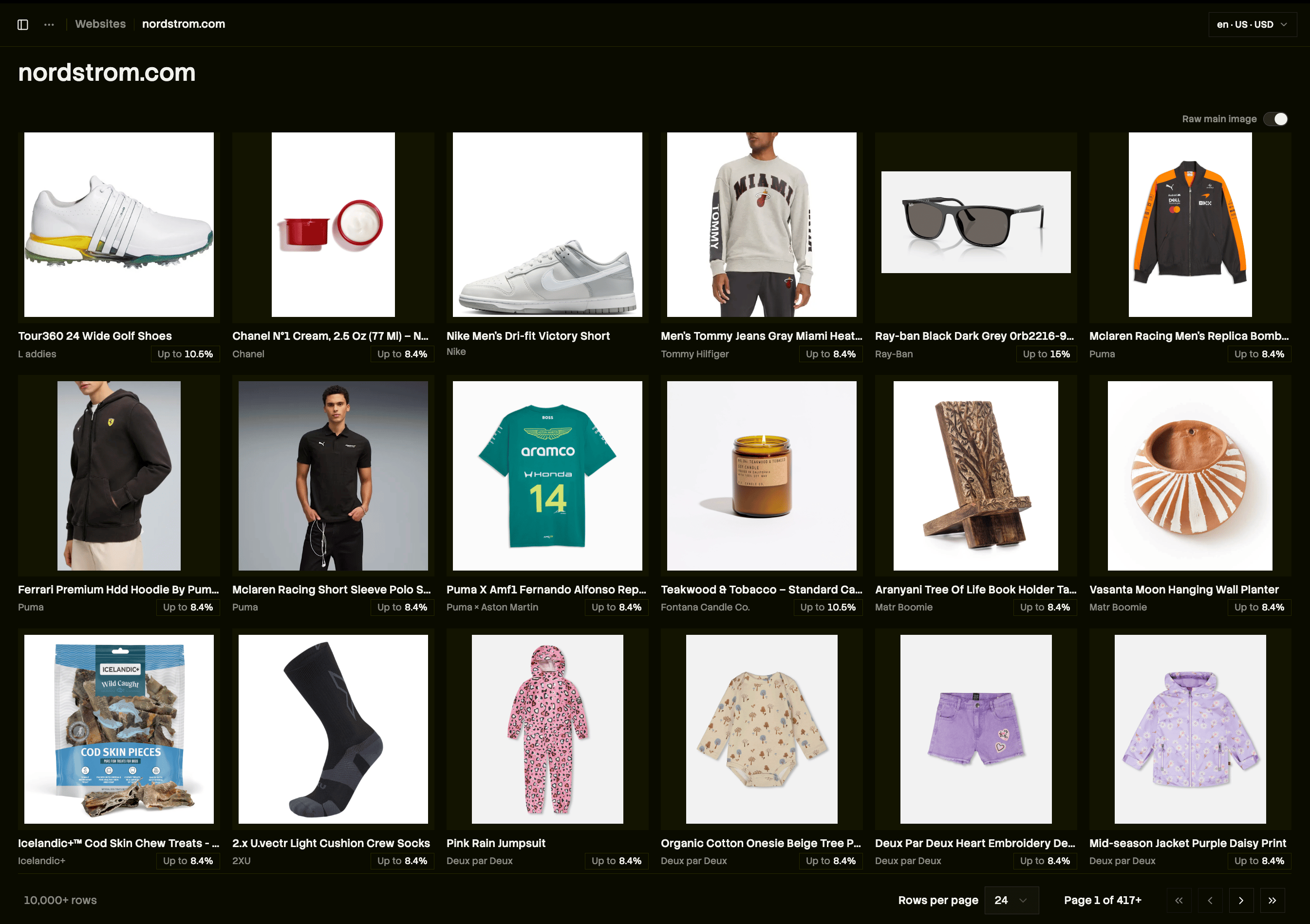
Take [nordstrom.com](http://nordstrom.com) on our dashboard. Before cleaned images, the product grid is good, but bad aspect ratios stick out and on-model shots break up the layout.

<Frame caption="Before: inconsistent aspect ratios and on-model shots break up the grid.">
  <img src="https://mintcdn.com/channel3/oRJ2GuCXjnj_w_5r/public/changelog/update5-nordstrom-before.png?fit=max&auto=format&n=oRJ2GuCXjnj_w_5r&q=85&s=f7cc4c45069086f025fdc19ceba52aeb" alt="A Nordstrom product grid before cleaned images, with mismatched aspect ratios and on-model shots" width="2690" height="1898" data-path="public/changelog/update5-nordstrom-before.png" />
</Frame>

With cleaned images, every tile is a square lay-flat shot — on-model photos are replaced, and narrow crops (like sunglasses) are padded to square.
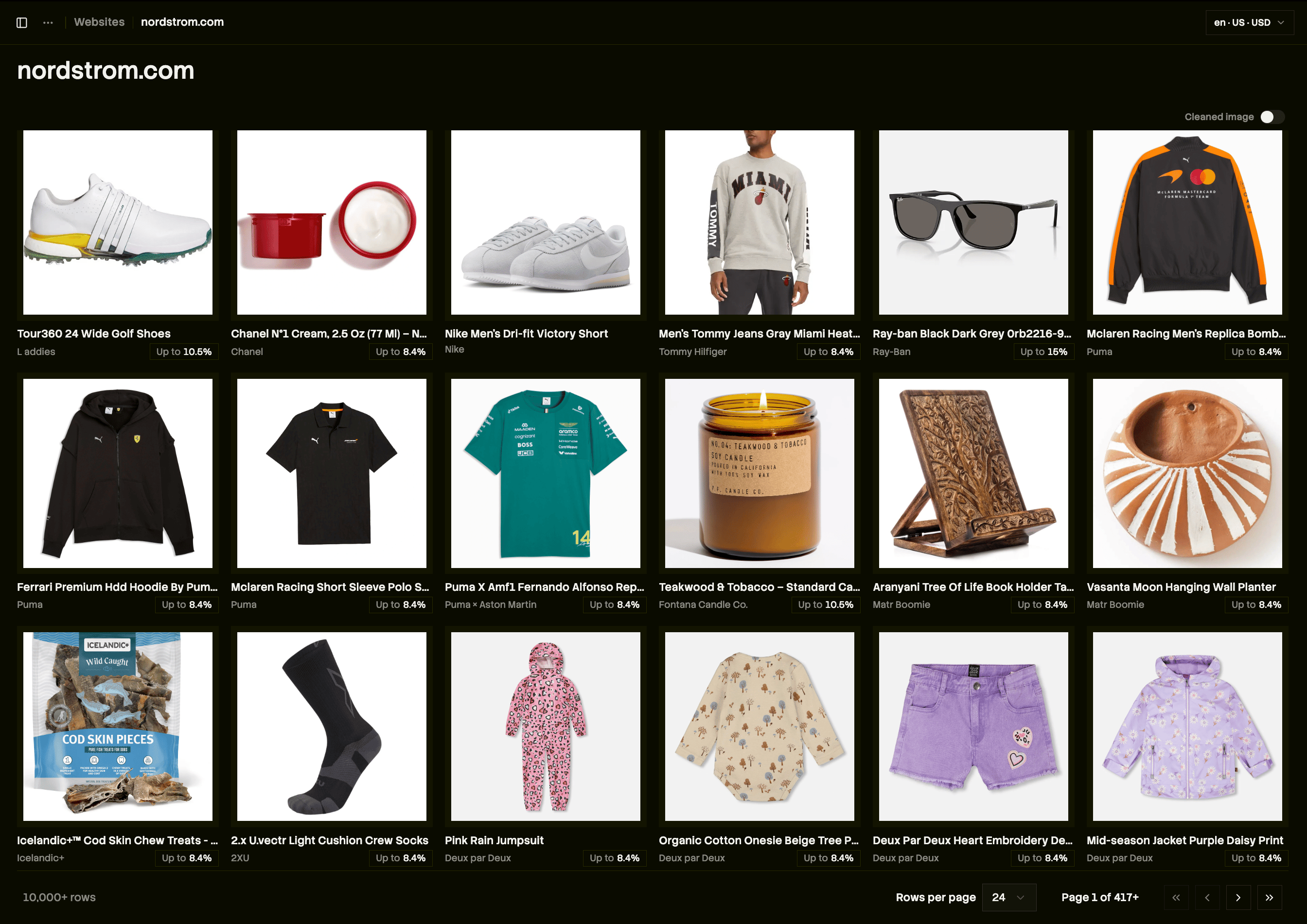
<Frame caption="After: every tile is a square, monochromatic lay-flat shot.">
  <img src="https://mintcdn.com/channel3/oRJ2GuCXjnj_w_5r/public/changelog/update5-nordstrom-after.png?fit=max&auto=format&n=oRJ2GuCXjnj_w_5r&q=85&s=5e732d847c7ba278fbc50093269edb06" alt="The same Nordstrom product grid after cleaned images, with uniform square tiles" width="2688" height="1900" data-path="public/changelog/update5-nordstrom-after.png" />
</Frame>

## Prefer cleaned images in grids

When displaying search or similar-product results, pick the cleaned image when one is available:

```typescript TypeScript theme={null}
const heroImage =
  product.images.find((img) => img.is_cleaned_image) ?? product.images[0];
```

This works on any product response that includes `images` — search, lookup, and product detail all expose the same `ProductImage` model.

<Cards>
  <Card title="Image Search" icon="image" href="/guides/image-search" arrow="true">
    Visual search is a common place to surface cleaned images in a grid.
  </Card>

  <Card title="Color Filters" icon="palette" href="/guides/color-filters" arrow="true">
    Combine color filters with cleaned images for palette-matched, uniform
    grids.
  </Card>

  <Card title="UI Components" icon="puzzle-piece" href="/guides/ui-and-hooks" arrow="true">
    Channel3 components can prefer cleaned images in product cards
    automatically.
  </Card>
</Cards>