> ## Documentation Index
> Fetch the complete documentation index at: https://docs.trychannel3.com/llms.txt
> Use this file to discover all available pages before exploring further.
# Variants How-To
> A deep dive on Variants — the data model, selecting variants, and building with them
*June 4, 2026 · API Update #6*
Hey Developer,
Today, we're taking a deep dive into **Variants, launched in SDK version 3.3.1**. TLDR: we figured out the hard stuff, so [you just have to copy/paste our docs into Cursor](https://docs.trychannel3.com/variants). If you run into any problems building with Variants, [drop a question in our Discord](https://discord.gg/6J6MjctXrH) or reply to this email.
We also did some housekeeping on categories returned on our Products, and you'll have to clean up a deprecated field.
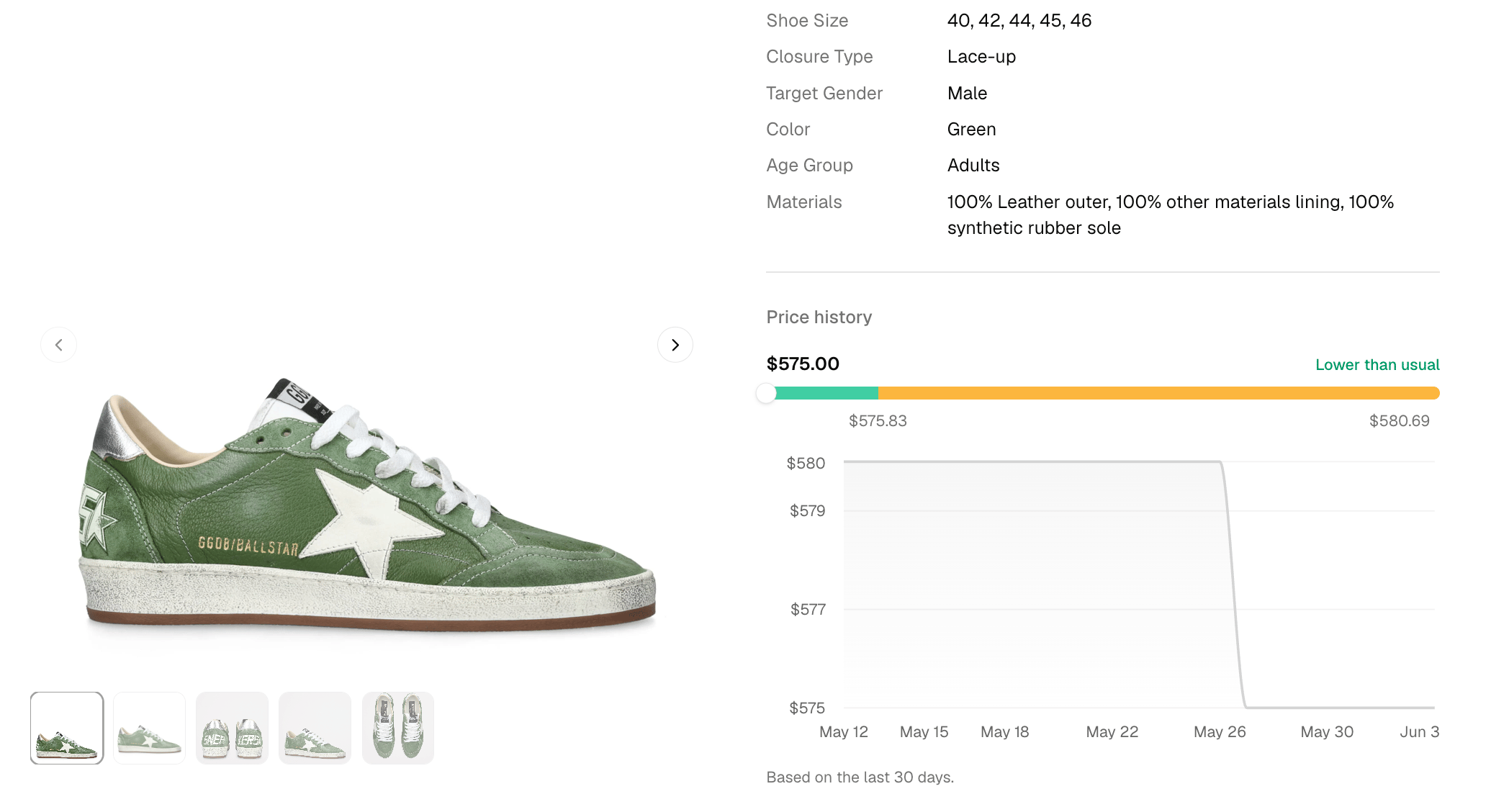
Finally, I want to shout out some old work we've done for all of the new devs that have signed up in the last few months. We're refreshing products at an all-time high rate, and recording their price fluctuations every time we refresh. As a result, our [**price tracking suite of endpoints**](https://docs.trychannel3.com/api-reference/price-tracking/start-tracking) **is more powerful than ever**, featuring real-time webhook updates and rich price history components to power a time-to-buy UI.
## Variants
We have an in-depth [guide to building with Variants on our docs](https://docs.trychannel3.com/variants). We also have a [Discord channel](https://discord.gg/6J6MjctXrH) designated for supporting your development, so if you hit any blockers, drop them in there!
For now, we'll discuss some important high-level concepts:
1. The Variant data model
2. Selecting Variants
3. Building with Variants
### Variant data model
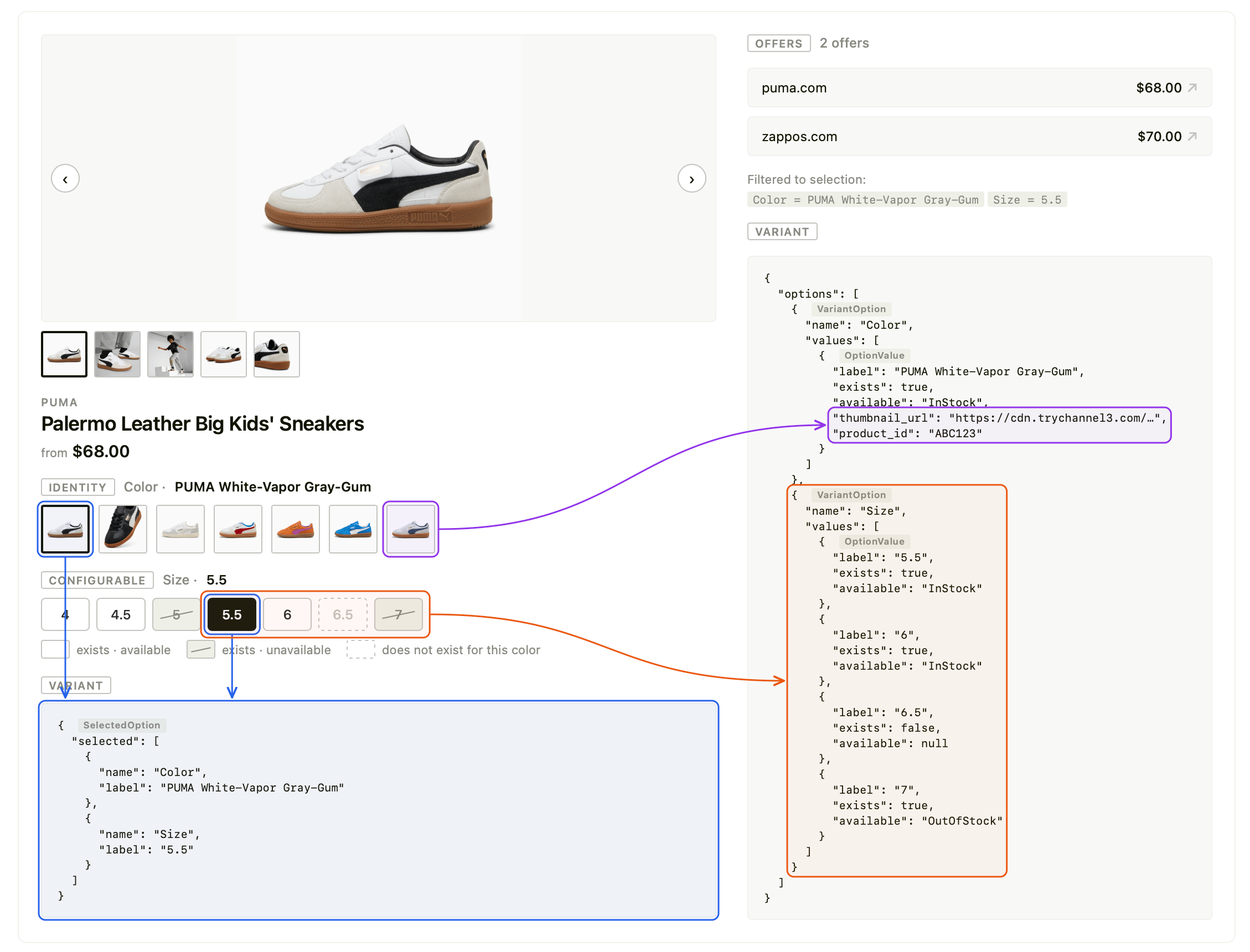
The [full Variant schema can be viewed here](https://docs.trychannel3.com/variants#the-variant-data-model). There are two core design primitives when building with variants: the value and the availability status. The image below shows a breakdown of a fully-featured PDP with a variant selector, and how the components map to our returned data model.
 **Variant values**
Variant values come in two shapes on our API: strings and images. The fields `thumbnail_url` and `label` determine the *content* of a variant selector button.
If a `VariantOption` has a `thumbnail_url`, we recommend displaying a thumbnail icon button. Each of these buttons links to a different `product_id` as well.
For configurations of the same product, we omit the `thumbnail_url`; these should just be displayed as a group of buttons or a dropdown selector displaying the `label`. These are the "Size" dimensions above.
**Availability status**
The values `available` and `exists` govern the *styling* of the variant selector button. There are 4 style states for variants: In Stock (`available=InStock`), Out of Stock (`available=OutOfStock`, `exists=true`), Not Available (`exists=false`), and Selected (`VariantOption == selected`).
We have a deep dive into [the distinction between these fields in the docs](https://docs.trychannel3.com/variants#available-vs-exists), and if you use our resources, your coding agent will simply get the UX correct. The simple breakdown is:
1. `availability` determines the stock status of an option. This Puma shoe is InStock in size 5.5, OutOfStock in size 5 and 7.
2. `exists` indicates whether a configuration exists at all for a specific selection, independent of availability. In the example above, there are no known listings for the White Vapor shoe in size 6.5. If the user selects 6.5, the API will return the closest computed match, which would be size 6.5 in a different color.
If you want to learn more about this, you can research "variant relaxation." Our current support for variant relaxation is V0; if you need more expressive variant selection, we can discuss in Discord.
### Selecting variants
You load variant selections using our [ProductDetail endpoint](https://docs.trychannel3.com/api-reference/v1/product-detail). You can select/reference variants two ways:
1. When an option has a `product_id`, you can use this `product_id` directly.
2. For an `OptionValue` without a `product_id`, append the query parameter `option_{VariantOption.name}={OptionValue.label}` — for the example above: `option_size=5.5`.
For example, to load the Hyperlink Blue shoe in size 6 from the current selection of the White shoe, you could equivalently call:
```
https://api.trychannel3.com/v1/products/XAtbsEk?option_Size=6
https://api.trychannel3.com/v1/products/SeAHhDT?option_Color=Hyperlink%20Blue-PUMA%20White&option_Size=6
```
**Every time you load a variant, you should render the selection from the returned `selected` field and rerender the state of each variant selector option from the returned `options`.**
### Building with variants
Variants are really complicated. For something so intuitive and seemingly so simple, there are many edge cases and pitfalls.
**The best way to build with variants is to lean on our docs, our skills, and a coding agent.**
1. Copy our [Variants docs page](https://docs.trychannel3.com/variants) into your preferred coding agent.
2. Add our [Channel3 API skill](https://docs.trychannel3.com/skills) to your coding agent: `npx skills add channel3-ai/skills --skill channel3-api`
3. Ask your coding agent to "render variant selectors under my product search results and on my PDP view."
**If you hit any snags, reach out in the [Discord](https://discord.gg/6J6MjctXrH) so others can learn alongside you.**
One final important distinction to understand with variants is our /v1/search vs /v1/products/{product_id} support for them, [outlined in-depth here](https://docs.trychannel3.com/variants#search-vs-product-detail). **/v1/search** returns *all offers* for the product, across all of its variations. **/v1/products** filters offers down to only those present in the provided selection — e.g. `/v1/products/ABC123?option_size=5.5` returns only the listed offers for that selection.
## Category
We recategorized all 100M+ products, so they have exactly one, high-quality category assignment.
`categories` on the Product response is now deprecated. [Switch over to `category`](https://docs.trychannel3.com/product-model), which returns a rich `CategorySummary`, and integrates seamlessly with our [**Categories** module](https://docs.trychannel3.com/categories).
Categories and strong categorization are especially important for refining search results. For example, if you're building a fashion app, you should *always* be filtering to the `apparel-accessories` category on all of your searches. This improvement to categorization also increased the quality of our search results, reducing the number of irrelevant or erroneous products returned.
## Price tracking + history
One of the highest-converting shopping experiences you can build is a deal finder. With our [Price Tracking module](https://docs.trychannel3.com/api-reference/price-tracking/start-tracking), you can build a deal finder in a matter of minutes.
We're now refreshing tens of millions of products a day and recording rich price history for all of them. For even higher-stakes deal hunting, we offer price tracking webhooks that notify you the moment a price drops.
Use the `/v0/price-tracking/history` endpoint to load price history for a product and build your own time-to-buy UI. Or, if you don't want to build a somewhat complex UI component, you can wait a week… we might have some components cooking 👀.
**Variant values**
Variant values come in two shapes on our API: strings and images. The fields `thumbnail_url` and `label` determine the *content* of a variant selector button.
If a `VariantOption` has a `thumbnail_url`, we recommend displaying a thumbnail icon button. Each of these buttons links to a different `product_id` as well.
For configurations of the same product, we omit the `thumbnail_url`; these should just be displayed as a group of buttons or a dropdown selector displaying the `label`. These are the "Size" dimensions above.
**Availability status**
The values `available` and `exists` govern the *styling* of the variant selector button. There are 4 style states for variants: In Stock (`available=InStock`), Out of Stock (`available=OutOfStock`, `exists=true`), Not Available (`exists=false`), and Selected (`VariantOption == selected`).
We have a deep dive into [the distinction between these fields in the docs](https://docs.trychannel3.com/variants#available-vs-exists), and if you use our resources, your coding agent will simply get the UX correct. The simple breakdown is:
1. `availability` determines the stock status of an option. This Puma shoe is InStock in size 5.5, OutOfStock in size 5 and 7.
2. `exists` indicates whether a configuration exists at all for a specific selection, independent of availability. In the example above, there are no known listings for the White Vapor shoe in size 6.5. If the user selects 6.5, the API will return the closest computed match, which would be size 6.5 in a different color.
If you want to learn more about this, you can research "variant relaxation." Our current support for variant relaxation is V0; if you need more expressive variant selection, we can discuss in Discord.
### Selecting variants
You load variant selections using our [ProductDetail endpoint](https://docs.trychannel3.com/api-reference/v1/product-detail). You can select/reference variants two ways:
1. When an option has a `product_id`, you can use this `product_id` directly.
2. For an `OptionValue` without a `product_id`, append the query parameter `option_{VariantOption.name}={OptionValue.label}` — for the example above: `option_size=5.5`.
For example, to load the Hyperlink Blue shoe in size 6 from the current selection of the White shoe, you could equivalently call:
```
https://api.trychannel3.com/v1/products/XAtbsEk?option_Size=6
https://api.trychannel3.com/v1/products/SeAHhDT?option_Color=Hyperlink%20Blue-PUMA%20White&option_Size=6
```
**Every time you load a variant, you should render the selection from the returned `selected` field and rerender the state of each variant selector option from the returned `options`.**
### Building with variants
Variants are really complicated. For something so intuitive and seemingly so simple, there are many edge cases and pitfalls.
**The best way to build with variants is to lean on our docs, our skills, and a coding agent.**
1. Copy our [Variants docs page](https://docs.trychannel3.com/variants) into your preferred coding agent.
2. Add our [Channel3 API skill](https://docs.trychannel3.com/skills) to your coding agent: `npx skills add channel3-ai/skills --skill channel3-api`
3. Ask your coding agent to "render variant selectors under my product search results and on my PDP view."
**If you hit any snags, reach out in the [Discord](https://discord.gg/6J6MjctXrH) so others can learn alongside you.**
One final important distinction to understand with variants is our /v1/search vs /v1/products/{product_id} support for them, [outlined in-depth here](https://docs.trychannel3.com/variants#search-vs-product-detail). **/v1/search** returns *all offers* for the product, across all of its variations. **/v1/products** filters offers down to only those present in the provided selection — e.g. `/v1/products/ABC123?option_size=5.5` returns only the listed offers for that selection.
## Category
We recategorized all 100M+ products, so they have exactly one, high-quality category assignment.
`categories` on the Product response is now deprecated. [Switch over to `category`](https://docs.trychannel3.com/product-model), which returns a rich `CategorySummary`, and integrates seamlessly with our [**Categories** module](https://docs.trychannel3.com/categories).
Categories and strong categorization are especially important for refining search results. For example, if you're building a fashion app, you should *always* be filtering to the `apparel-accessories` category on all of your searches. This improvement to categorization also increased the quality of our search results, reducing the number of irrelevant or erroneous products returned.
## Price tracking + history
One of the highest-converting shopping experiences you can build is a deal finder. With our [Price Tracking module](https://docs.trychannel3.com/api-reference/price-tracking/start-tracking), you can build a deal finder in a matter of minutes.
We're now refreshing tens of millions of products a day and recording rich price history for all of them. For even higher-stakes deal hunting, we offer price tracking webhooks that notify you the moment a price drops.
Use the `/v0/price-tracking/history` endpoint to load price history for a product and build your own time-to-buy UI. Or, if you don't want to build a somewhat complex UI component, you can wait a week… we might have some components cooking 👀.
 Want to build something, but we don't support your use-case? Drop a request in the [Discord](https://discord.gg/6J6MjctXrH) or hit reply and let us know.
And, as always, we love to hear what you're building!
The Channel3 Team
Want to build something, but we don't support your use-case? Drop a request in the [Discord](https://discord.gg/6J6MjctXrH) or hit reply and let us know.
And, as always, we love to hear what you're building!
The Channel3 Team