> ## Documentation Index
> Fetch the complete documentation index at: https://docs.trychannel3.com/llms.txt
> Use this file to discover all available pages before exploring further.
# SDK 3.3.1 — Color Filters, Cleaned Images & a CLI
> Search color filters, cleaned images, and a brand-new Channel3 CLI
*May 26, 2026 · API Update #5*
Hey Developer,
**SDK version 3.3.1 has landed!**
Before this release, we were already the best (and only) product API when it came to image understanding. We're doubling down on this, launching **search color filters** and **cleaned images**, all in a minor SDK release. These features are in addition to our in-depth image understanding, including classified image shot types and generated alt text, which is already live on our [API `ProductImage` type](https://docs.trychannel3.com/api-reference/v1/search).
Also, **we launched a [CLI](https://docs.trychannel3.com/cli)!** If you're in the MCP-is-dead camp, install our CLI with `brew install channel3-ai/tap/channel3` and point your preferred agent at it. We also [**supercharged our Skills**](https://github.com/channel3-ai/skills) to leverage the CLI, and they really feel like magic when used with a personal agent.
If you sleuth through our [**SDK changelog**](https://docs.trychannel3.com/changelog/overview), you'll notice we're not going to cover most of the changes here. We did a lot, and some of these changes deserve their own update (variants, structured attributes).
## Cleaned images
**Cleaned images** are product images that have the following properties:
1. Square aspect ratio
2. Uniform, monochromatic background
and are indicated on our API under the [`ProductImage` type with the flag `is_cleaned_image`](https://docs.trychannel3.com/api-reference/v1/search).
Cleaned images are perfect for displaying a uniform, consistent product grid.
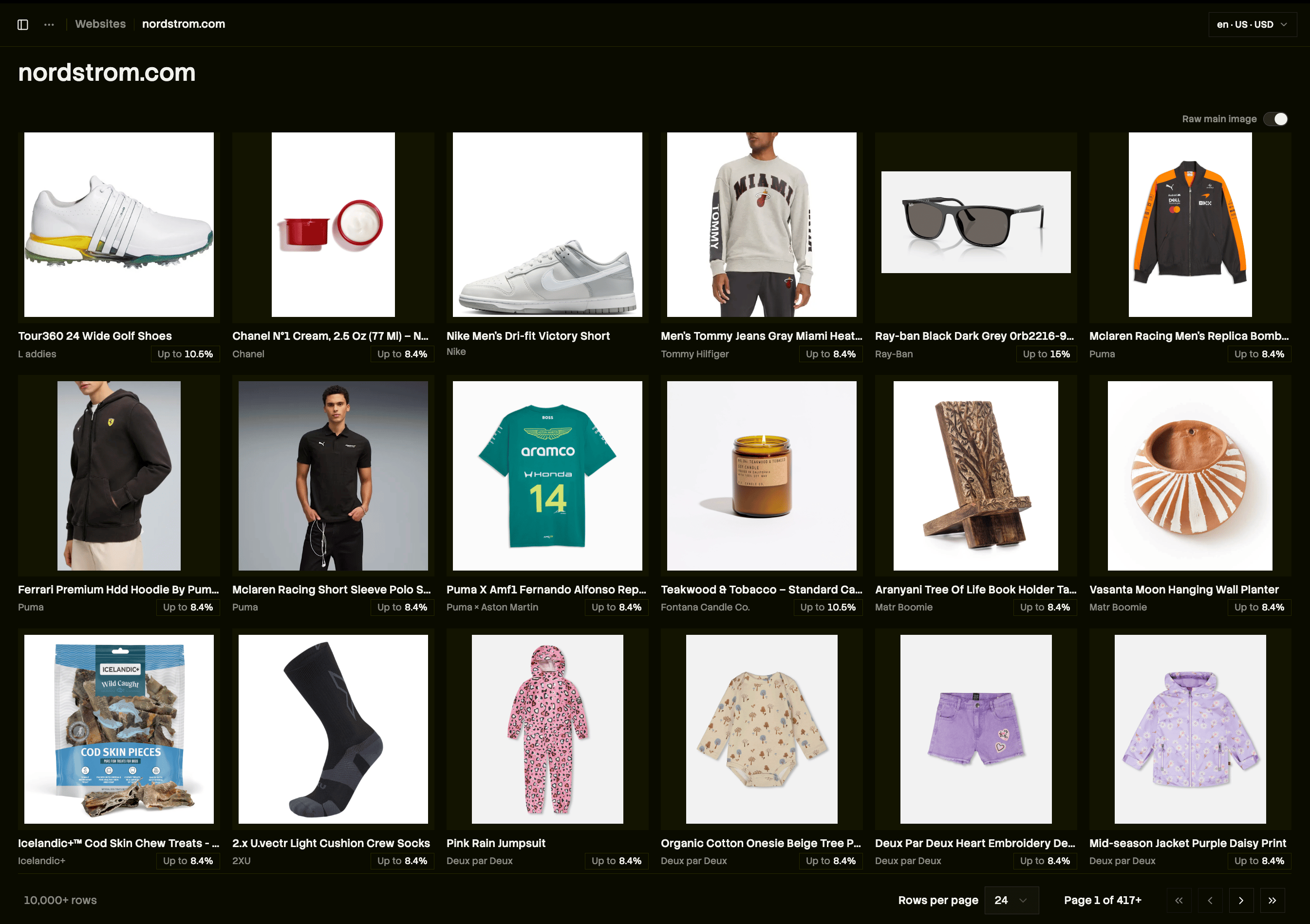
Take [nordstrom.com](http://nordstrom.com) on our dashboard. Before cleaned images, this is what the product grid looks like. It's good, but those bad aspect ratios stick out like a sore thumb, and the on-model shots are glaring.
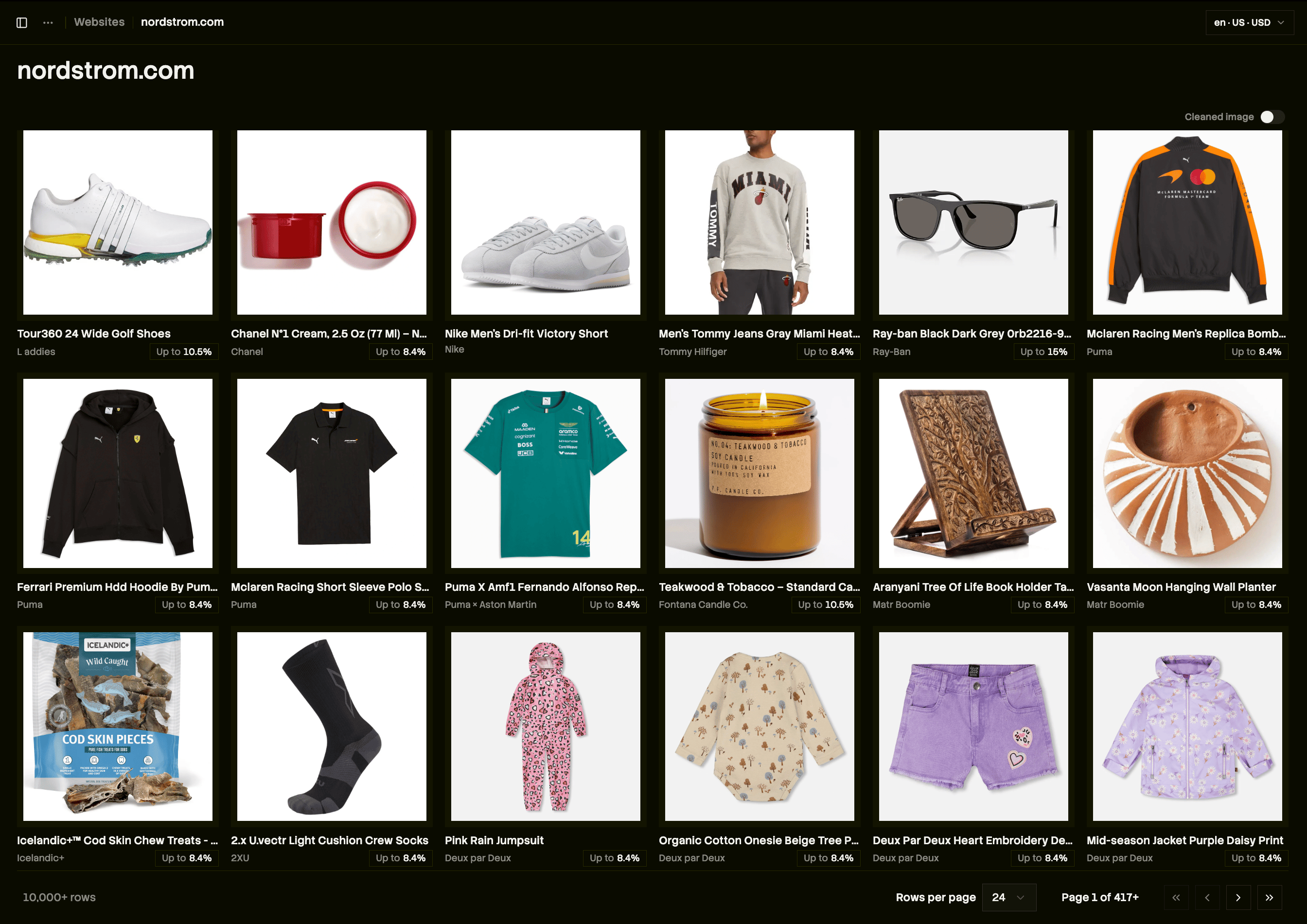
 Now, check out the page with cleaned images below. It's subtle, but significantly better:
* Every image is the perfect aspect ratio
* Those on-model shots have been replaced with cleaned, square lay-flat shots
* The sunglasses, which were a narrow rectangle, have padding extending the image to a square
Now, check out the page with cleaned images below. It's subtle, but significantly better:
* Every image is the perfect aspect ratio
* Those on-model shots have been replaced with cleaned, square lay-flat shots
* The sunglasses, which were a narrow rectangle, have padding extending the image to a square
 In practice, this increases the conversion rate of both the products that previously displayed inconsistent on-model shots and the entire product grid. And, it looks super slick.
**To adopt cleaned images, simply ask your coding agent to "prefer displaying images with `is_cleaned_image` in my product grid view."**
## Search color filters
With **`SearchColorsFilter`**, you can provide a `hex` and a `percentage` filter to your `/v1/search` query, so every search result is a product matching the provided color profile. See the [docs for this filter here](https://docs.trychannel3.com/api-reference/v1/search).
[Cosmos](https://www.cosmos.so) is an inspiration/moodboard/design app for creatives. One of its entry points is a simple color picker that kicks you off on a truly beautiful journey through a sea of themed images. We were inspired by this experience and decided we could build this for products. Thus, `SearchColorsFilter` was born. We've analyzed, extracted, and indexed color palettes for millions of products.
I'll note that this field is in beta. We were so amazed by this tool, we wanted to share it with you ASAP! Two specific cautions:
1. Our coverage for indexed colors is good, but color space is large (16 million hex codes). At times, some irrelevant results will slip in. This is simply a consequence of the search space with the color filter applied being prohibitively small.
2. We might change the API shape — we've marked it as beta in the docs. Feedback is super helpful here, drop it in the [Discord](https://discord.gg/6J6MjctXrH).
## Search color filters + cleaned images
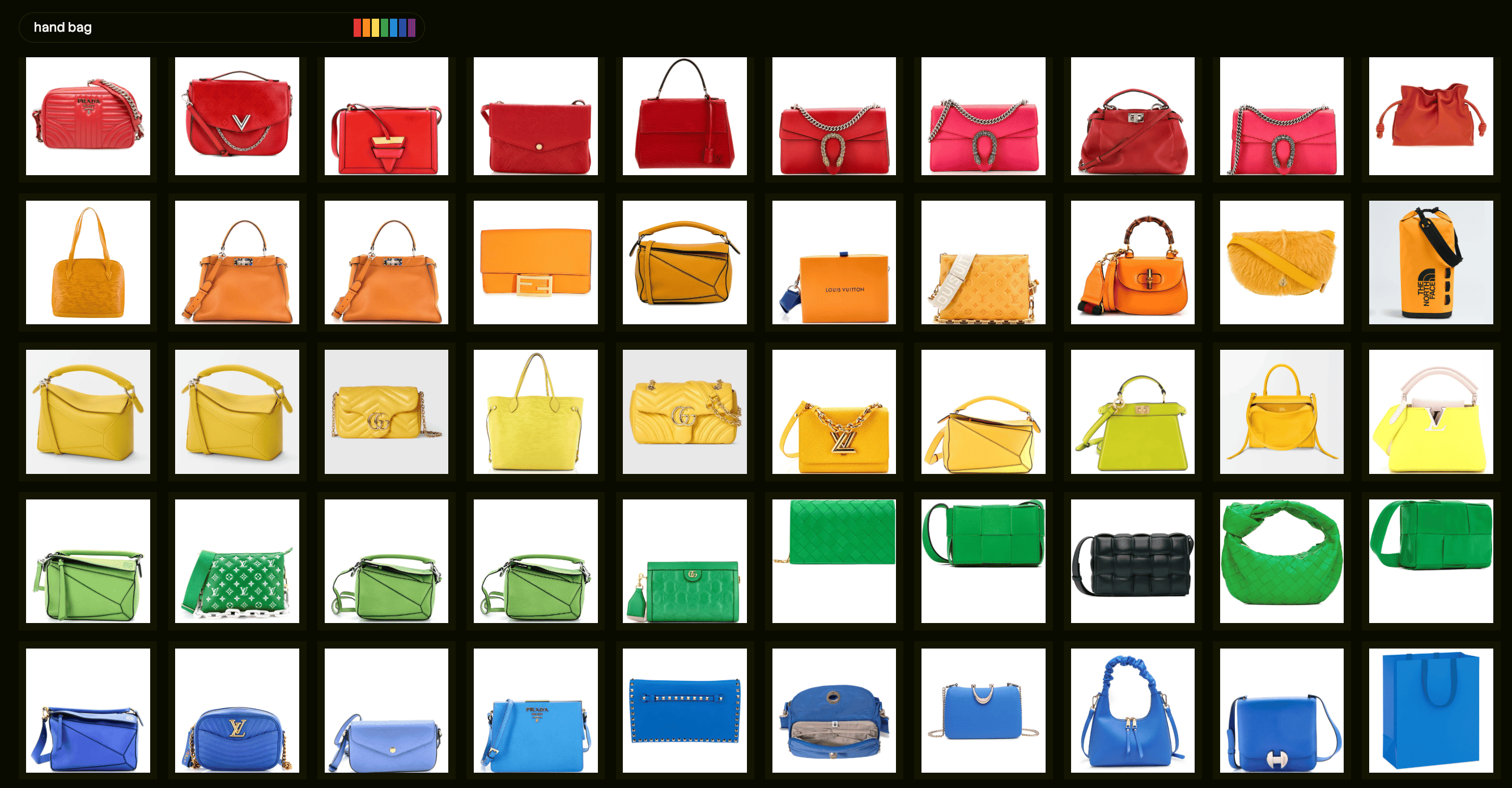
We don't actually expose a way to do specifically this search (yet), but let me brag for a second. Look at these search results — perfectly uniform, totally adherent to the provided palette, and incredibly aesthetic. This is Pinterest or Cosmos for shopping. Someone, please build this!!
In practice, this increases the conversion rate of both the products that previously displayed inconsistent on-model shots and the entire product grid. And, it looks super slick.
**To adopt cleaned images, simply ask your coding agent to "prefer displaying images with `is_cleaned_image` in my product grid view."**
## Search color filters
With **`SearchColorsFilter`**, you can provide a `hex` and a `percentage` filter to your `/v1/search` query, so every search result is a product matching the provided color profile. See the [docs for this filter here](https://docs.trychannel3.com/api-reference/v1/search).
[Cosmos](https://www.cosmos.so) is an inspiration/moodboard/design app for creatives. One of its entry points is a simple color picker that kicks you off on a truly beautiful journey through a sea of themed images. We were inspired by this experience and decided we could build this for products. Thus, `SearchColorsFilter` was born. We've analyzed, extracted, and indexed color palettes for millions of products.
I'll note that this field is in beta. We were so amazed by this tool, we wanted to share it with you ASAP! Two specific cautions:
1. Our coverage for indexed colors is good, but color space is large (16 million hex codes). At times, some irrelevant results will slip in. This is simply a consequence of the search space with the color filter applied being prohibitively small.
2. We might change the API shape — we've marked it as beta in the docs. Feedback is super helpful here, drop it in the [Discord](https://discord.gg/6J6MjctXrH).
## Search color filters + cleaned images
We don't actually expose a way to do specifically this search (yet), but let me brag for a second. Look at these search results — perfectly uniform, totally adherent to the provided palette, and incredibly aesthetic. This is Pinterest or Cosmos for shopping. Someone, please build this!!
 ## CLI
Full setup instructions can be found [on our docs](https://docs.trychannel3.com/cli), but getting running with the CLI is as easy as:
```bash theme={null}
brew install channel3-ai/tap/channel3
export CHANNEL3_API_KEY="your_api_key_here"
```
(add that environment variable to your `.zshrc` or `.bashrc` so you never have to set it again)
CLIs are a great tool for pointing personal agents to if you don't want the context bloat of adding MCPs. The CLI is simply our API, in CLI form, fully equipped with search, price tracking, and all the auxiliary endpoints.
The CLI is enhanced when paired with our Skills, which instruct your agent on *how* to use the CLI. [Channel3 Skills](https://docs.trychannel3.com/skills) can be installed in one line as well:
```bash theme={null}
npx skills add channel3-ai/skills --skill product-discovery
```
Want to build something, but we don't support your use-case? Drop a request in the [Discord](https://discord.gg/6J6MjctXrH) or hit reply and let us know.
And, as always, we love to hear what you're building!
The Channel3 Team
## CLI
Full setup instructions can be found [on our docs](https://docs.trychannel3.com/cli), but getting running with the CLI is as easy as:
```bash theme={null}
brew install channel3-ai/tap/channel3
export CHANNEL3_API_KEY="your_api_key_here"
```
(add that environment variable to your `.zshrc` or `.bashrc` so you never have to set it again)
CLIs are a great tool for pointing personal agents to if you don't want the context bloat of adding MCPs. The CLI is simply our API, in CLI form, fully equipped with search, price tracking, and all the auxiliary endpoints.
The CLI is enhanced when paired with our Skills, which instruct your agent on *how* to use the CLI. [Channel3 Skills](https://docs.trychannel3.com/skills) can be installed in one line as well:
```bash theme={null}
npx skills add channel3-ai/skills --skill product-discovery
```
Want to build something, but we don't support your use-case? Drop a request in the [Discord](https://discord.gg/6J6MjctXrH) or hit reply and let us know.
And, as always, we love to hear what you're building!
The Channel3 Team