> ## Documentation Index
> Fetch the complete documentation index at: https://docs.trychannel3.com/llms.txt
> Use this file to discover all available pages before exploring further.
# Endpoints, endpoints, endpoints
> Two new endpoints — /v1/similar and /v1/image-search — plus our first Developer Spotlight
*May 9, 2026 · API Update #3*
Hello Developer,
We added [**/v1/similar**](https://docs.trychannel3.com/api-reference/v1/similar) so you can provide an essential component of any shopping experience: product recommendations. We've all seen a "you might also like this" or "frequently bought with" section of a product detail page. With **/v1/similar**, you can now add the same to your app's PDPs. This is especially powerful when coupled with Channel3's cross-merchant canonicalization, letting shoppers view product alternatives and multiple offers, all in one clean UI and two simple API calls.
[**/v1/image-search**](https://docs.trychannel3.com/api-reference/v1/image-search) lets you run visual search across our entire product index. Our /search endpoint is still multimodal, but this is a helpful tool for personal shopping agents specifically. No context leak, just a simple, single-query endpoint.
Pricing for both endpoints is 1 credit, like everything else. Pricing info is available [on our docs](https://docs.trychannel3.com/pricing).
Lastly, we're kicking off a new section in these updates: a **Developer Spotlight**. In every email, we'll showcase an app or a demo that someone built on the Channel3 API. If you want feedback or just to show off what you've been working on, reply to this email or share it directly in the [#showcase channel of our Discord](https://discord.gg/6J6MjctXrH).
## Similar products
**How it works:** `/similar` simply takes a product ID and returns a list of products that are visually similar to the provided product. The easiest way to get set up is to install our Channel3 SDK skills with:
```bash theme={null}
npx skills add channel3-ai/skills --skill channel3-api
```
and ask your favorite coding agent to "`/channel3-api` add a product recommendation carousel below my main product view with the /similar endpoint." I asked Claude to do this with our dashboard (literally pasted the exact prompt above) and this is what it one-shotted:

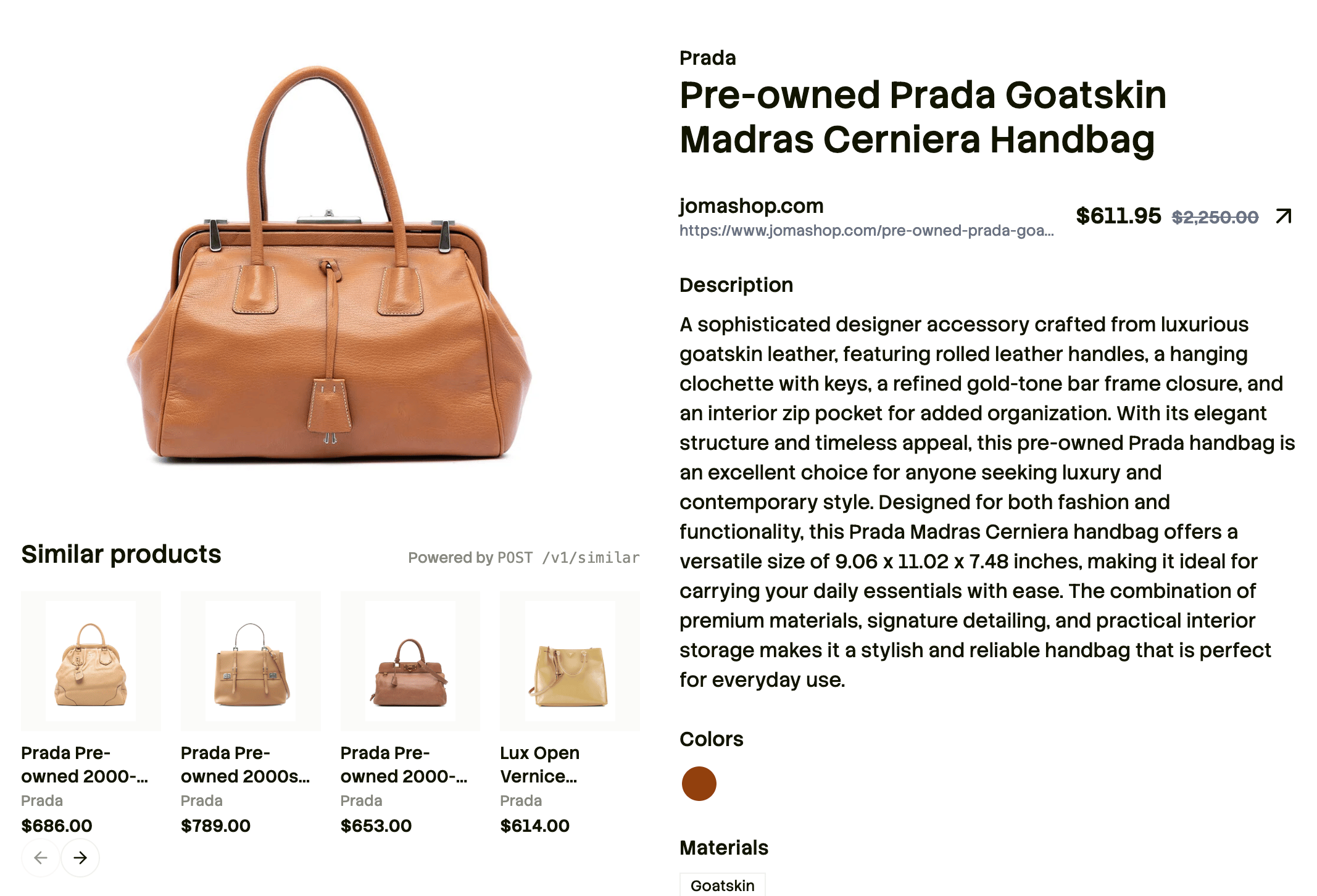 The buck doesn't stop with just a simple lookalike product, though. With our [robust `SearchFilters`](https://docs.trychannel3.com/api-reference/v1/similar), you can build some pretty amazing recommendation experiences.
**Some ideas:**
* Try excluding the product's returned gender with the gender filter to get a his-and-hers couple shopping experience.
* For products in the `shirts-tops` category, set a category filter to `pants` and `shoes` for a "shop the look" response. [Full list of category slugs here.](https://docs.trychannel3.com/categories)
* You can get results for the whole family by putting age filters for kids and toddlers.
* Set a price filter based on the price of the original product for a deal-finder budget shopper.
These are just a few ways we've played with this endpoint internally. If you come up with a clever use case (or for any of our other endpoints), share it in the [Discord #showcase channel](https://discord.gg/6J6MjctXrH)!
## Image search
**How it works:** just provide an image URL or base64 and we'll return semantically relevant results based on the image. This is great for shopping someone else's fit recommendations, either from a TikTok or IRL.
We'll still support multimodal search and pure image search on our /v1/search endpoint, but we've found agents especially perform better when provided this explicitly as a tool.
**An idea:** I'd love to see someone use an image segmentation model + [/v1/image-search](https://docs.trychannel3.com/api-reference/v1/image-search) and build a shop-the-look feature. Take a full-body mirror selfie, grab "top," "bottoms," and "shoes," and run 3 parallel image searches!
## Developer Spotlight: Penny
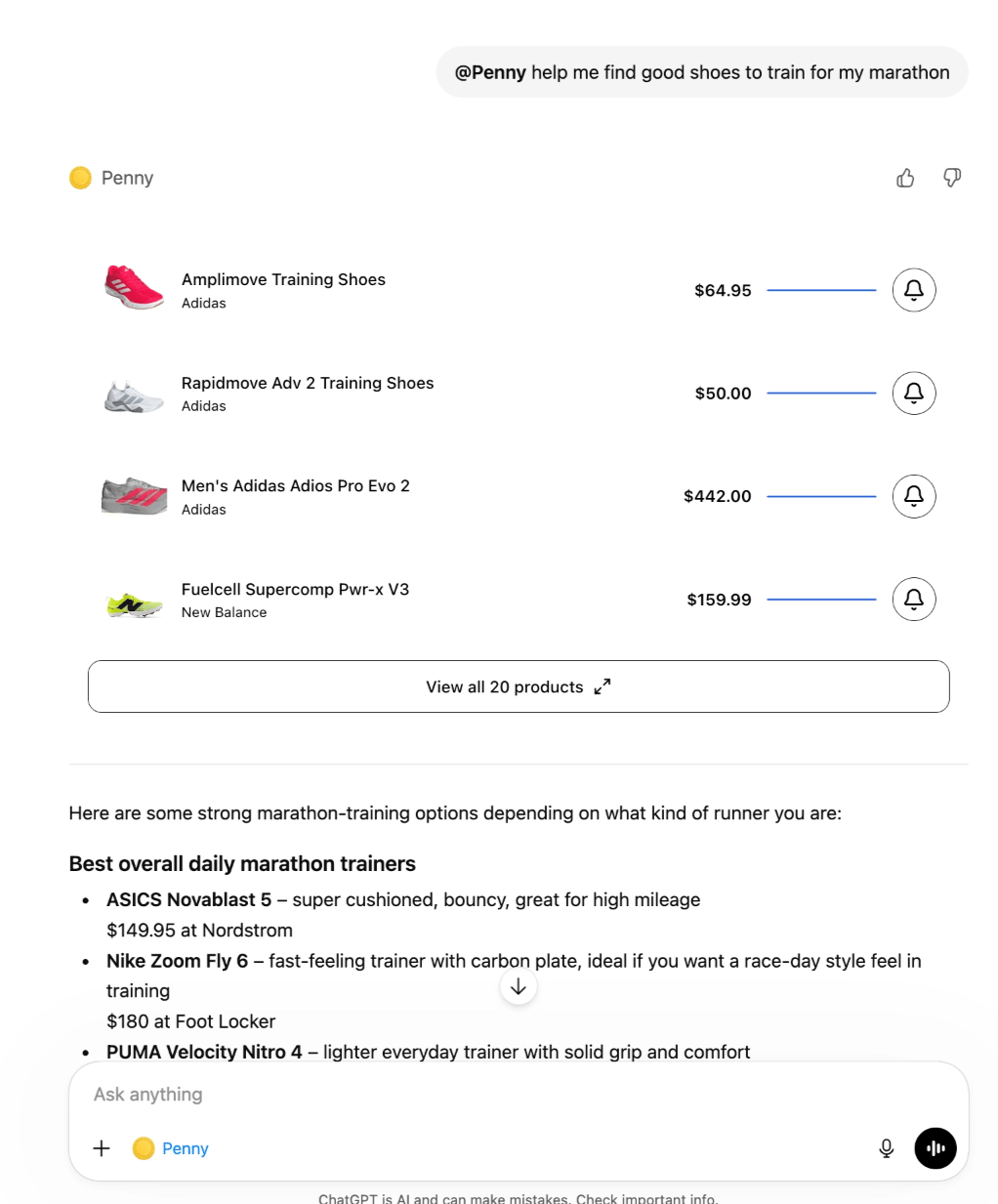
This week's developer spotlight features Penny, a ChatGPT app and browser extension deal finder! They both use the [Channel3 Price Tracking API](https://docs.trychannel3.com/api-reference/price-tracking/start-tracking) to display a time-to-buy graphic and [notify users when prices drop](https://docs.trychannel3.com/price-tracking-webhooks).
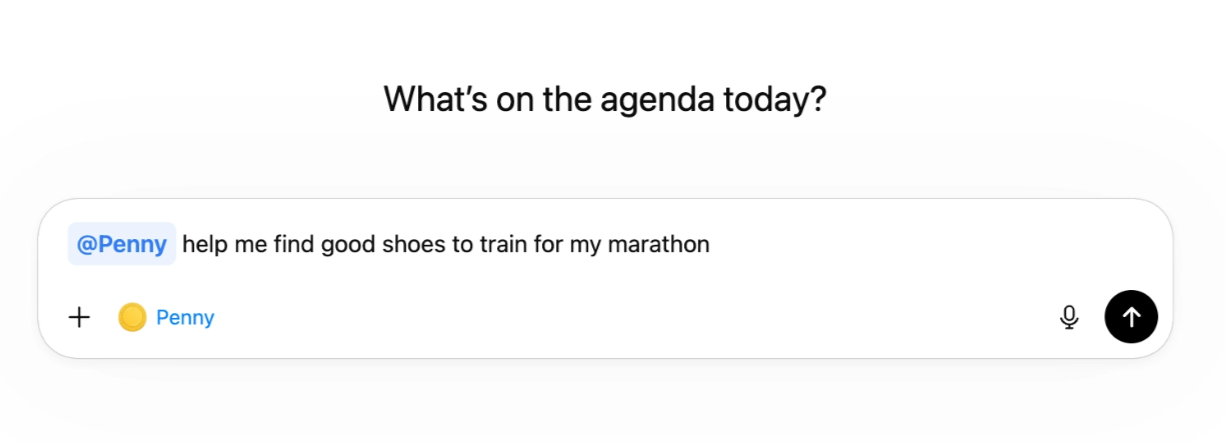
On ChatGPT, you can install the app and invoke it with **@Penny**. I have a love-hate relationship with ChatGPT shopping, and Penny feels a world better. To me, ChatGPT shopping feels like generic ChatGPT answers with products slapped on top. Penny is a first-class shopping experience; a personal shopper agent embedded in your ChatGPT.
The buck doesn't stop with just a simple lookalike product, though. With our [robust `SearchFilters`](https://docs.trychannel3.com/api-reference/v1/similar), you can build some pretty amazing recommendation experiences.
**Some ideas:**
* Try excluding the product's returned gender with the gender filter to get a his-and-hers couple shopping experience.
* For products in the `shirts-tops` category, set a category filter to `pants` and `shoes` for a "shop the look" response. [Full list of category slugs here.](https://docs.trychannel3.com/categories)
* You can get results for the whole family by putting age filters for kids and toddlers.
* Set a price filter based on the price of the original product for a deal-finder budget shopper.
These are just a few ways we've played with this endpoint internally. If you come up with a clever use case (or for any of our other endpoints), share it in the [Discord #showcase channel](https://discord.gg/6J6MjctXrH)!
## Image search
**How it works:** just provide an image URL or base64 and we'll return semantically relevant results based on the image. This is great for shopping someone else's fit recommendations, either from a TikTok or IRL.
We'll still support multimodal search and pure image search on our /v1/search endpoint, but we've found agents especially perform better when provided this explicitly as a tool.
**An idea:** I'd love to see someone use an image segmentation model + [/v1/image-search](https://docs.trychannel3.com/api-reference/v1/image-search) and build a shop-the-look feature. Take a full-body mirror selfie, grab "top," "bottoms," and "shoes," and run 3 parallel image searches!
## Developer Spotlight: Penny
This week's developer spotlight features Penny, a ChatGPT app and browser extension deal finder! They both use the [Channel3 Price Tracking API](https://docs.trychannel3.com/api-reference/price-tracking/start-tracking) to display a time-to-buy graphic and [notify users when prices drop](https://docs.trychannel3.com/price-tracking-webhooks).
On ChatGPT, you can install the app and invoke it with **@Penny**. I have a love-hate relationship with ChatGPT shopping, and Penny feels a world better. To me, ChatGPT shopping feels like generic ChatGPT answers with products slapped on top. Penny is a first-class shopping experience; a personal shopper agent embedded in your ChatGPT.
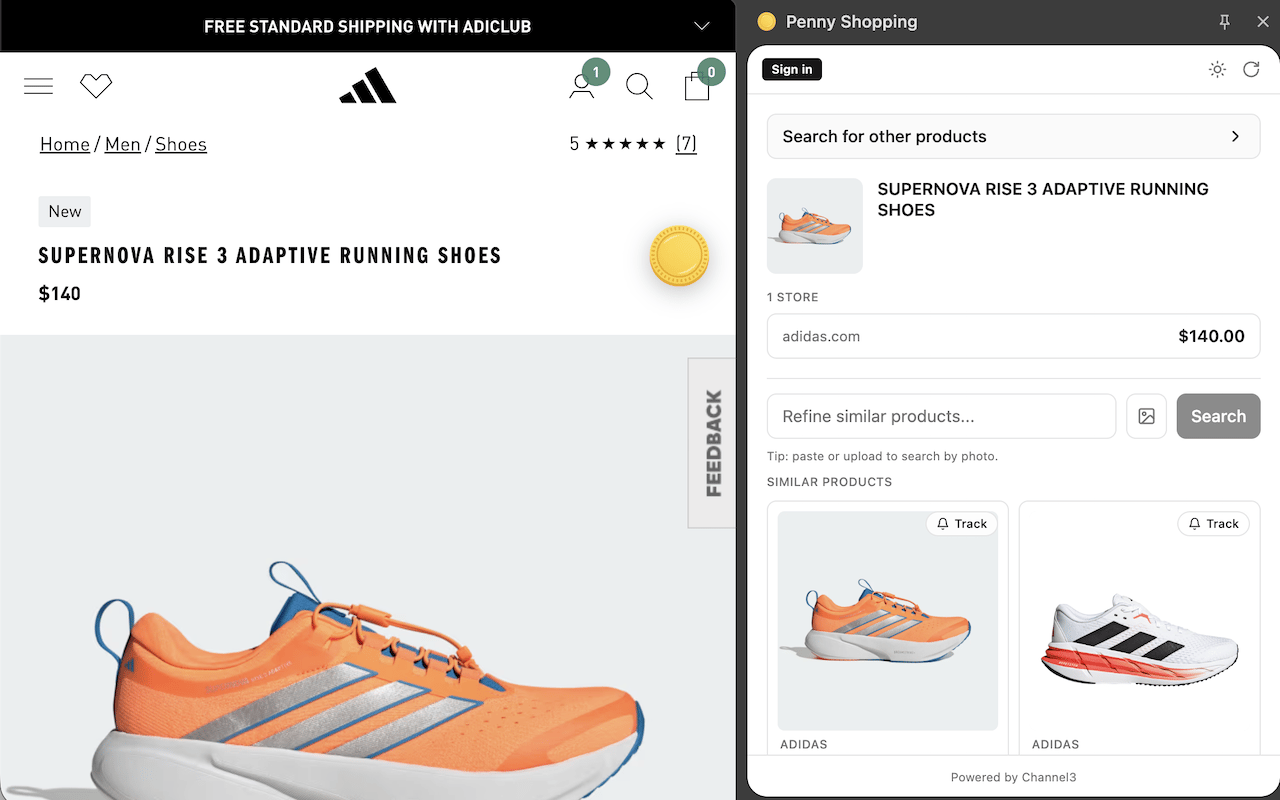
 The browser extension is an agentic deal finder that walks the line between finding better deals and recommending alternatives when a deal doesn't exist. You can use it on any PDP either as a simple deal finder or a full-on personal assistant.
 If you want your app spotlighted next, hit reply or check out the [#showcase Discord channel](https://discord.gg/6J6MjctXrH)!
Want to build something, but we don't support your use-case? Drop a request in the [Discord](https://discord.gg/6J6MjctXrH) or hit reply and let us know.
And, as always, we love to hear what you're building!
The Channel3 Team
If you want your app spotlighted next, hit reply or check out the [#showcase Discord channel](https://discord.gg/6J6MjctXrH)!
Want to build something, but we don't support your use-case? Drop a request in the [Discord](https://discord.gg/6J6MjctXrH) or hit reply and let us know.
And, as always, we love to hear what you're building!
The Channel3 Team